Getting Started Tutorial
The following simple examples will help you quickly understand the basic development and applications of the Galbot robot. To run all the examples below, you need to first download and install the Galbot SDK and configure it according to the Installation and Configuration instructions.
Example1. Basic Robot Control
This example demonstrates the basic control of the GALBOT robot. After executing this program, the robot's two arms will slowly raise to the top of its head, forming a heart-like gesture. After initializing the robot instance and checking the safety status, the robot's left and right arms execute a preset heart gesture sequence. The arms first move to the heart gesture position and hold for a period of time, then return to the original posture. The entire process includes basic control flows such as joint position acquisition, joint angle setting, blocking wait, and exception handling.
Note: 1. Keep the emergency stop button in the open state; 2. Ensure there are no obstructions within 2 meters around the robot to avoid dangerous contact between the arms and obstacles.
"""
Note: When running this example, please ensure the robot's `emergency stop button` is released;
"""
import time

try:
    from galbot_sdk.g1  import GalbotRobot, ControlStatus
except ImportError:
    print("Failed to import galbot_sdk, please install it first or check if it is in PYTHONPATH")
    exit(1)


def demo_heart_pose(robot: GalbotRobot,
                    joint_group_names: list,
                    position_seq: list,
                    is_blocking: bool,
                    max_speed: float,
                    timeout_s: float,
                    retry_count: int = 3
                    ):
    """
    Robot heart gesture demonstration function

    Parameters:
        robot (GalbotRobot): GalbotRobot instance
        joint_group_names (list): List of joint group names to control
        position_seq (list): List of joint group angle sequences to set
        is_blocking (bool): Whether to set angles in blocking mode
        max_speed (float): Maximum speed
        timeout_s (float): Timeout time (seconds)
        retry_count (int, optional): Number of retries, default is 3

    Returns:
        None
    """

    # Get current joint group angles for subsequent restoration
    original_pos = robot.get_joint_positions(joint_group_names, [])
    print(f"Current angles of joint group {joint_group_names}: {original_pos}")

    # Start heart gesture
    pos_idx = 0
    print("Starting heart gesture...")
    while True:
        time.sleep(1)
        pos = position_seq[pos_idx]
        control_status = robot.set_joint_positions(
            pos, joint_group_names, [], is_blocking, max_speed, timeout_s
        )

        # If setting fails, retry 3 times
        retry_cnt = retry_count
        while control_status != ControlStatus.SUCCESS and retry_cnt > 0:
            print(f"Setting angles for joint group {joint_group_names} failed, retrying {retry_cnt}...")
            retry_cnt = retry_cnt - 1
            time.sleep(1)
            control_status = robot.set_joint_positions(
                pos, joint_group_names, [], is_blocking, max_speed, timeout_s
            )
        # If successful, switch to next pose sequence
        if control_status == ControlStatus.SUCCESS:
            print(f"Setting angles for joint group {joint_group_names} successful")
            pos_idx = pos_idx + 1
        # If failed, break the loop
        else:
            print(f"Setting angles for joint group {joint_group_names} failed")
            break

        # If all pose sequences are completed, break the loop
        if pos_idx > len(position_seq) - 1:
            break

    # Get current joint group angles
    print("Showing heart gesture for 15 seconds, then restoring original pose...")
    time.sleep(5)

    # Restore original pose joint group angles
    control_status = robot.set_joint_positions(
        original_pos, joint_group_names, [], is_blocking, max_speed, timeout_s
    )
    # If setting fails, retry 5 times
    retry_cnt = retry_count
    while control_status != ControlStatus.SUCCESS and retry_cnt > 0:
        print(f"Setting angles for joint group {joint_group_names} failed, retrying {retry_cnt}...")
        retry_cnt = retry_cnt - 1
        time.sleep(2)
        control_status = robot.set_joint_positions(
            original_pos, joint_group_names, [], is_blocking, max_speed, timeout_s
        )
    # If successful, restore original pose
    if control_status == ControlStatus.SUCCESS:
        print(f"Restoring angles for joint group {joint_group_names} successful")
    else:
        print(f"Restoring angles for joint group {joint_group_names} failed")

def check_robot_safety():
    """Check if the robot is safe"""
    # Prompt for precautions
    print("⚠️  Note: 1. Please ensure the robot's emergency stop button is released; 2. Please ensure there are no obstacles in front, back, left, and right of the robot to avoid unexpected situations.")
    while True:
        key = input("Please confirm that the robot's emergency stop button is released and there are no obstacles. Continue? (y/n)...")
        if key == 'y':
            print("User confirmed, continuing execution...")
            break
        elif key == 'n':
            print("User not confirmed, program exiting...")
            exit(1)
        else:
            print("Input error, please enter 'y' or 'n'")

def main():
    check_robot_safety()

    try:
        # Get robot instance
        robot = GalbotRobot.get_instance()

        # Initialize robot
        state = robot.init()
        if not state:
            print(f"Initialization failed")
            exit(1)
        else:
            print(f"Initialization successful")
            print(f"Is robot running: {robot.is_running()}")

        # Wait for data preparation
        time.sleep(3)

        # Get list of joint names
        joint_names = robot.get_joint_names()
        if len(joint_names) > 0:
            print(f"List of joint names: {joint_names}")
        else:
            print(f"Failed to get list of joint names")

        # Get joint positions using joint group names, empty returns all joints by default
        joint_group_names = ["left_arm", "right_arm"]
        # Left and right arm heart gesture sequence
        position_seq = [
            [1.53, 0.36, -2.54, -1.80, 0.12, -0.82, 0.09, # left_arm
             -1.53, -0.36, 2.54, 1.80, -0.12, 0.82, -0.09] # right_arm
        ]
        # Whether to block and wait for joints to reach position
        is_blocking = True
        # Limit maximum joint speed to 0.1rad/s
        max_speed = 0.1
        # Maximum blocking wait time
        timeout_s = 20

        # Perform heartbeat gesture
        demo_heart_pose(robot, joint_group_names, position_seq,
                        is_blocking, max_speed, timeout_s)

    except Exception as e:
        print(f"An exception occurred: {e}")
    finally:
        # Actively send SIGINT shutdown signal
        robot.request_shutdown()
        # Wait to enter shutdown state
        robot.wait_for_shutdown()
        # Release SDK resources
        robot.destroy()
        print('Resource release successful')


if __name__ == "__main__":
    main()
Example2. Arm Manipulation
This example demonstrates the arm manipulation of the GALBOT robot. After executing this program, the robot's left arm will slowly raise to a certain height and then slowly return to its original posture. The main functionalities include forward and inverse kinematics (IK/FK) solving, end-effector pose control, and joint angle setting. By obtaining the current left arm end-effector pose, using inverse kinematics to calculate the joint angles corresponding to the target pose, setting the joint angles to move the robot to the target position, verifying the consistency between the final pose and the target pose, and finally restoring the robot to its original pose.
Note: 1. Keep the emergency stop button in the open state; 2. Ensure there are no obstructions within 2 meters around the robot to avoid dangerous contact between the arms and obstacles.
"""
Note: When running this example, please ensure the robot's motion control service `/data/galbot/bin/service_motion_plan`,
    robot state publishing service `/data/galbot/bin/robot_state_publish`,
    and hand-eye calibration publishing service `/data/galbot/bin/eyehand_calib_publish` are loaded;
"""
try:
    import galbot_sdk.g1 as gm
    from galbot_sdk.g1 import GalbotMotion, GalbotRobot, ControlStatus
except ImportError:
    print("Failed to import galbot_sdk, please install it first or check if it is in PYTHONPATH")
    exit(1)

import os

try:
    import numpy as np
except ImportError:
    os.system("pip install numpy")
    import numpy as np

import time
from typing import Sequence, Dict

def printStatus(status):
    if(status == gm.MotionStatus.SUCCESS):
        print("Execution result: SUCCESS, Execution successful")
    elif(status == gm.MotionStatus.TIMEOUT):
        print("Execution result: TIMEOUT, Execution timeout")
    elif(status == gm.MotionStatus.FAULT):
        print("Execution result: FAULT, Fault occurred, unable to continue execution")
    elif(status == gm.MotionStatus.INVALID_INPUT):
        print("Execution result: INVALID_INPUT, Input parameters do not meet requirements")
    elif(status == gm.MotionStatus.INIT_FAILED):
        print("Execution result: INIT_FAILED, Internal communication component creation failed")
    elif(status == gm.MotionStatus.IN_PROGRESS):
        print("Execution result: IN_PROGRESS, Moving but not in position")
    elif(status == gm.MotionStatus.STOPPED_UNREACHED):
        print("Execution result: STOPPED_UNREACHED, Stopped but did not reach target")
    elif(status == gm.MotionStatus.DATA_FETCH_FAILED):
        print("Execution result: DATA_FETCH_FAILED, Data acquisition failed")
    elif(status == gm.MotionStatus.PUBLISH_FAIL):
        print("Execution result: PUBLISH_FAIL, Data sending failed")
    elif(status == gm.MotionStatus.COMM_DISCONNECTED):
        print("Execution result: COMM_DISCONNECTED, Connection failed")

def quat_normalize(q: np.ndarray) -> np.ndarray:
    q = np.array(q, dtype=np.float64)
    return q / np.linalg.norm(q)

def quat_conjugate(q: np.ndarray) -> np.ndarray:
    """
    Calculate the conjugate of a quaternion

    Parameters:
        q (np.ndarray): Input quaternion [x, y, z, w]

    Returns:
        np.ndarray: Conjugate of the quaternion [x, y, z, w]
    """
    qx, qy, qz, qw = q
    return np.array([-qx, -qy, -qz, qw])

def quat_multiply(q1: np.ndarray, q2: np.ndarray) -> np.ndarray:
    """
    Calculate the product of two quaternions

    Parameters:
        q1 (np.ndarray): First quaternion [x, y, z, w]
        q2 (np.ndarray): Second quaternion [x, y, z, w]

    Returns:
        np.ndarray: Product of the two quaternions [x, y, z, w]
    """
    x1, y1, z1, w1 = q1
    x2, y2, z2, w2 = q2
    return np.array([
        w1*x2 + x1*w2 + y1*z2 - z1*y2,
        w1*y2 - x1*z2 + y1*w2 + z1*x2,
        w1*z2 + x1*y2 - y1*x2 + z1*w2,
        w1*w2 - x1*x2 - y1*y2 - z1*z2
    ])

def orientation_error_angle(A: np.ndarray, B: np.ndarray) -> float:
    """
    Calculate the rotation angle error between two quaternions (radians)

    Parameters:
        A (np.ndarray): First quaternion [x, y, z, w]
        B (np.ndarray): Second quaternion [x, y, z, w]

    Returns:
        float: Rotation angle error (radians)
    """
    qA = quat_normalize(A[3:7])
    qB = quat_normalize(B[3:7])

    q_err = quat_multiply(qB, quat_conjugate(qA))
    q_err = quat_normalize(q_err)

    # Numerical stability
    qw = np.clip(q_err[3], -1.0, 1.0)

    angle = 2 * np.arccos(qw)
    return angle  # Unit: radians


def calculate_error(pose1: Sequence[float], pose2: Sequence[float]) -> Dict[str, float]:
    """
    Calculate position error and rotation error between two poses (radians)

    Parameters:
        pose1 (Sequence[float]): First pose [x, y, z, qx, qy, qz, qw]
        pose2 (Sequence[float]): Second pose [x, y, z, qx, qy, qz, qw]

    Returns:
        dict: Dictionary containing position error (meters) and rotation error (radians)
    """
    A, B = np.array(pose1), np.array(pose2)
    pos_err = np.linalg.norm(A[:3] - B[:3])
    rot_err = orientation_error_angle(A, B)

    return {
        "position_error_norm": pos_err,
        "orientation_error_rad": rot_err,
        "orientation_error_deg": np.degrees(rot_err)
    }

def check_robot_safety():
    """Check if the robot is safe"""
    # Prompt for precautions
    print("⚠️  Note: 1. Please ensure the robot's emergency stop button is released; 2. Please ensure there are no obstacles in front, back, left, and right of the robot to avoid unexpected situations.")
    while True:
        key = input("Please confirm that the robot's emergency stop button is released and there are no obstacles. Continue? (y/n)...")
        if key == 'y':
            print("User confirmed, continuing execution...")
            break
        elif key == 'n':
            print("User not confirmed, program exiting...")
            exit(1)
        else:
            print("Input error, please enter 'y' or 'n'")

def main():
    check_robot_safety()
    try:
        # Get GalbotMotion singleton and initialize
        motion = GalbotMotion.get_instance()
        robot = GalbotRobot.get_instance()

        if motion.init():
            print("GalbotMotion initialization successful")
        else:
            print("GalbotMotion initialization failed")
        if robot.init():
            print("GalbotRobot initialization successful")
        else:
            print("GalbotRobot initialization failed")

        # Program starts immediately, wait for data readiness time
        time.sleep(3)

        # Define target pose
        chain_pose_baselink = {
            "leg": [0.0596,-0.0000,1.0327,0.5000,0.5003,0.4997,0.5000],
            "head": [0.0599,0.0002,1.4098,-0.7072,0.0037,0.0037,0.7069],
            "left_arm": [0.1267,0.2342,0.7356,0.0220,0.0127,0.0343,0.9991],
            "right_arm": [0.1267,-0.2345,0.7358,-0.0225,0.0126,-0.0343,0.9991]
        }

        # set initial joint positions
        joint_pos = [0.5, 1.5, 1.0, 0.0, 0.0,
                     0.0, 0.0,
                     2.0, -1.5, -0.6, -1.7, 0.0, -0.8, 0.0,
                     -2.0, 1.5, 0.6, 1.7, 0.0, 0.8, 0.0]
        joint_groups_names = ["leg", "head", "left_arm", "right_arm"]
        joint_names = []
        is_blocking = True
        max_speed_rad_s = 0.1
        timeout_s = 30.0

        status = robot.set_joint_positions(
            joint_pos, joint_groups_names, joint_names, is_blocking, max_speed_rad_s, timeout_s
        )

        if status != ControlStatus.SUCCESS:
            print("set join position failed")
        else:
            print("set join position successful")

        # Define target chain name, target pose, reference pose, end link
        target_frame = "EndEffector"
        reference_frame = "base_link"
        target_chain = "left_arm"
        end_link = "left_arm_end_effector_mount_link"

        # 1. Get current left_arm end-effector pose
        try:
            status, original_pose = motion.get_end_effector_pose_on_chain(
                chain_name=target_chain,
                frame_id=target_frame,
                reference_frame=reference_frame
            )
            assert status == gm.MotionStatus.SUCCESS, "Failed to get end-effector pose"
            print(f"✅ Current {target_chain} end-effector pose: {original_pose}")
            time.sleep(0.8)
        except Exception as e:
            print(f"❌ Exception getting end-effector pose by chain name: {e}")

        # 2. Solve joint angles based on target pose IK and verify the solution
        # 2.1 Solve joint angles joint_angles_ik for target pose through IK
        try:
            status, joint_angles_ik = motion.inverse_kinematics(
                target_pose=chain_pose_baselink[target_chain],
                chain_names=[target_chain],
                target_frame=target_frame,
                reference_frame=reference_frame,
                enable_collision_check=False # Disable collision detection
            )
            assert status == gm.MotionStatus.SUCCESS, "IK solving failed"
            print(f"✅ Target {target_chain} IK solving successful joint_angles_ik: {joint_angles_ik}")
            time.sleep(1)
        except Exception as e:
            print(f"❌ IK solving exception: {e}")

        # 2.2 Set end-effector pose to target pose tgt_pose_ik by setting joint group angles joint_angles_ik
        try:
            status = robot.set_joint_positions(
                joint_angles_ik[target_chain],
                [target_chain],
                [],
                True,
                0.1,
                20.0,
            )
            assert status == ControlStatus.SUCCESS, "Setting joint group angles failed"
            print(f"✅ Setting {target_chain} joint group angles successful.")
            time.sleep(1)
        except Exception as e:
            print(f"❌ Setting {target_chain} joint group angles exception: {e}")

        # 2.3 Verify whether the set joint group angles are consistent with the solved angles
        try:
            status, tgt_pose_ik = motion.get_end_effector_pose_on_chain(
                chain_name=target_chain,
                frame_id=target_frame,
                reference_frame=reference_frame
            )
            assert status == gm.MotionStatus.SUCCESS, "Failed to get end-effector pose"
            print(f"✅ Getting {target_chain} end-effector pose successful: {tgt_pose_ik}")
            time.sleep(1)

            error = calculate_error(tgt_pose_ik, chain_pose_baselink[target_chain])
            print(f"End-effector pose error: {error}")
        except Exception as e:
            print(f"❌ Getting {target_chain} end-effector pose exception: {e}")

        # 2.4 Verify whether the end-effector pose tgt_pose_fk corresponding to joint group angles joint_angles_ik solved by FK is consistent with target pose tgt_pose_ik
        try:
            status, tgt_pose_fk = motion.forward_kinematics(
                target_frame=end_link,
                reference_frame=reference_frame,
                joint_state=joint_angles_ik,
                params=gm.Parameter()
            )
            assert status == gm.MotionStatus.SUCCESS, "FK solving failed"
            print(f"✅ Target {target_chain} FK solving successful: {tgt_pose_fk}")
            time.sleep(1)

            error = calculate_error(tgt_pose_fk, chain_pose_baselink[target_chain])
            print(f"FK solving error: {error}")
        except Exception as e:
            print(f"❌ FK solving exception: {e}")

        time.sleep(3)
        print()

        # 3. Restore to original pose by setting end-effector pose
        # 3.1 Set end-effector pose to restore to original pose
        try:
            status = motion.set_end_effector_pose(
                target_pose=original_pose,
                end_effector_frame=target_chain,
                reference_frame=reference_frame,
                enable_collision_check=False,
                is_blocking=True,
                timeout=5.0,
                params=gm.Parameter()
            )
            assert status == gm.MotionStatus.SUCCESS, "Setting end-effector pose failed"
            print(f"✅ Setting end-effector pose successful: status={status}")
            time.sleep(1)
        except Exception as e:
            print(f"❌ Setting {target_chain} end-effector pose exception: {e}")

        # 3.2 Get end-effector pose and verify whether it has been restored to original pose
        try:
            status, original_pose_rec = motion.get_end_effector_pose_on_chain(
                chain_name=target_chain,
                frame_id=target_frame,
                reference_frame=reference_frame
            )
            assert status == gm.MotionStatus.SUCCESS, "Failed to get end-effector pose"
            print(f"✅ Getting {target_chain} end-effector pose successful: {original_pose_rec}")
            time.sleep(0.8)

            error = calculate_error(original_pose_rec, original_pose)
            print(f"Restore end-effector pose error: {error}")
        except Exception as e:
            print(f"❌ Setting end-effector pose exception: {e}")

    except Exception as e:
        print(f"❌ Main program exception: {e}")
    finally:
        robot.request_shutdown()
        robot.wait_for_shutdown()
        robot.destroy()

if __name__=="__main__":
    main()
Example3. Robot Navigation
This example demonstrates the navigation functionality of the GALBOT robot. After executing this program, the robot will navigate a square path in front and to the left of its starting position. After initializing the navigation and robot instances and checking the safety status, the robot executes a square trajectory motion, moving forward 0.5 meters and turning left 90 degrees each time, repeating 4 times to form a square path, and returning to the starting position after completion. The entire process includes navigation control functions such as pose acquisition, path reachability checking, navigation to target points, target arrival detection, and exception handling.
Note: 1. Keep the emergency stop button in the open state; 2. Ensure there are no obstructions within 2 meters around the robot to avoid dangerous contact between the arms and obstacles.
"""
Note: When running this example, please confirm that the robot's navigation function `/data/galbot/bin/service_navigation_plan` has been loaded;
"""
try:
    from galbot_sdk.g1  import GalbotNavigation, GalbotRobot
except ImportError:
    print("Failed to import galbot_sdk, please install it first or check if it's in PYTHONPATH")
    exit(1)

import os

try:
    import numpy as np
except ImportError:
    os.system("pip install numpy")
    import numpy as np

try:
    from scipy.spatial.transform import Rotation as R
except ImportError:
    os.system("pip install scipy")
    from scipy.spatial.transform import Rotation as R

import time
from typing import Sequence, Dict

def quat_normalize(q: np.ndarray) -> np.ndarray:
    q = np.array(q, dtype=np.float64)
    return q / np.linalg.norm(q)

def quat_conjugate(q: np.ndarray) -> np.ndarray:
    """
    Calculate the conjugate of a quaternion

    Parameters:
        q (np.ndarray): Input quaternion [x, y, z, w]

    Returns:
        np.ndarray: Conjugate of the quaternion [x, y, z, w]
    """
    qx, qy, qz, qw = q
    return np.array([-qx, -qy, -qz, qw])

def quat_multiply(q1: np.ndarray, q2: np.ndarray) -> np.ndarray:
    """
    Calculate the product of two quaternions

    Parameters:
        q1 (np.ndarray): First quaternion [x, y, z, w]
        q2 (np.ndarray): Second quaternion [x, y, z, w]

    Returns:
        np.ndarray: Product of the two quaternions [x, y, z, w]
    """
    x1, y1, z1, w1 = q1
    x2, y2, z2, w2 = q2
    return np.array([
        w1*x2 + x1*w2 + y1*z2 - z1*y2,
        w1*y2 - x1*z2 + y1*w2 + z1*x2,
        w1*z2 + x1*y2 - y1*x2 + z1*w2,
        w1*w2 - x1*x2 - y1*y2 - z1*z2
    ])

def orientation_error_angle(A: np.ndarray, B: np.ndarray) -> float:
    """
    Calculate the rotation angle error between two quaternions (in radians)

    Parameters:
        A (np.ndarray): First quaternion [x, y, z, w]
        B (np.ndarray): Second quaternion [x, y, z, w]

    Returns:
        float: Rotation angle error (in radians)
    """
    qA = quat_normalize(A[3:7])
    qB = quat_normalize(B[3:7])

    q_err = quat_multiply(qB, quat_conjugate(qA))
    q_err = quat_normalize(q_err)

    # Numerically stable
    qw = np.clip(q_err[3], -1.0, 1.0)

    angle = 2 * np.arccos(qw)
    return angle  # Unit: radians


def calculate_error(pose1: Sequence[float], pose2: Sequence[float]) -> Dict[str, float]:
    """
    Calculate the position error and rotation error between two poses (in radians)

    Parameters:
        pose1 (Sequence[float]): First pose, [x, y, z, qx, qy, qz, qw]
        pose2 (Sequence[float]): Second pose, [x, y, z, qx, qy, qz, qw]

    Returns:
        dict: Dictionary containing position error (in meters) and rotation error (in radians)
    """
    A, B = np.array(pose1), np.array(pose2)
    pos_err = np.linalg.norm(A[:3] - B[:3])
    rot_err = orientation_error_angle(A, B)

    return {
        "position_error_norm": pos_err,
        "orientation_error_rad": rot_err,
        "orientation_error_deg": np.degrees(rot_err)
    }

def local_pose_to_global(start_pose: Sequence[float], local_pose: Sequence[float]):
    """
    Convert local pose to global pose

    Parameters:
        start_pose (Sequence[float]): Start pose, [x, y, z, qx, qy, qz, qw]
        local_pose (Sequence[float]): Local pose, [x, y, z, qx, qy, qz, qw]

    Returns:
        Sequence[float]: Global pose, [x, y, z, qx, qy, qz, qw]
    """
    start_mat = np.eye(4)
    start_mat[:3, :3] = R.from_quat([start_pose[3], start_pose[4], start_pose[5], start_pose[6]]).as_matrix()
    start_mat[:3, 3] = [start_pose[0], start_pose[1], start_pose[2]]

    local_mat = np.eye(4)
    local_mat[:3, :3] = R.from_quat([local_pose[3], local_pose[4], local_pose[5], local_pose[6]]).as_matrix()
    local_mat[:3, 3] = [local_pose[0], local_pose[1], local_pose[2]]

    global_mat = start_mat @ local_mat

    return global_mat[:3, 3].tolist() + R.from_matrix(global_mat[:3, :3]).as_quat().tolist()

def demo_square_move(robot: GalbotRobot, nav: GalbotNavigation):
    """
    Demonstrate robot moving in a square pattern in navigation environment

    Parameters:
        robot (GalbotRobot): Robot instance
        nav (GalbotNavigation): Navigation instance
    """
    try:
        start_pose = nav.get_current_pose()
    except Exception as e:
        print(f"Failed to get current pose: {e}")
        return

    # Move forward 0.5m, turn left 90 degrees
    local_pose = [0.5, 0.0, 0.0, 0.0, 0.0, 0.707, 0.707]

    try:
        # Move forward 0.5m each time, turn left 90 degrees, repeat 4 times to form a square
        for _ in range(4):
            # Calculate target pose
            cur_pose = nav.get_current_pose()
            goal_pose = local_pose_to_global(cur_pose, local_pose)

            # Check if path is reachable
            if nav.check_path_reachability(goal_pose, cur_pose):
                # Navigate to target pose
                retry_cnt = 3
                while True:
                    status = nav.navigate_to_goal(goal_pose, enable_collision_check=True, is_blocking=True, timeout=30)
                    time.sleep(0.5)
                    retry_cnt -= 1
                    if nav.check_goal_arrival() or retry_cnt < 0:
                        break
                    else:
                        print(f"Navigation failed, retrying...{retry_cnt}")
                print("navigate_to_goal return status:", status)
                print("Has arrived:", nav.check_goal_arrival())
            else:
                print("Path unreachable or unsafe")

        cur_pose = nav.get_current_pose()
        print(f"Current pose: {cur_pose}, Error from start pose: {calculate_error(cur_pose, start_pose)}")
    except Exception as e:
        print(f"Exception occurred during navigation: {e}")

def move_to_original(robot: GalbotRobot, nav: GalbotNavigation):
    """
    Demonstrate robot returning to start pose in navigation environment

    Parameters:
        robot (GalbotRobot): Robot instance
        nav (GalbotNavigation): Navigation instance
    """
    cur_pose = nav.get_current_pose()
    goal_pose = [0, 0, 0, 0, 0, 0, 1]

    try:
        if nav.check_path_reachability(goal_pose, cur_pose):
            retry_cnt = 3
            while True:
                status = nav.navigate_to_goal(goal_pose, enable_collision_check=True, is_blocking=True, timeout=30)
                time.sleep(0.5)
                retry_cnt -= 1
                if nav.check_goal_arrival() or retry_cnt < 0:
                    break
                else:
                    print(f"Navigation failed, retrying...{retry_cnt}")
            print("navigate_to_goal return status:", status)
            print("Has arrived:", nav.check_goal_arrival())
        else:
            print("Path unreachable or unsafe")
    except Exception as e:
        print(f"Exception occurred during navigation: {e}")

def check_robot_safety():
    """Check if robot is safe"""
    # Prompt important notes
    print("⚠️  Note: 1. Please ensure the emergency stop button of the robot is released; 2. Please ensure there are no obstructions around the robot to avoid unexpected situations; 3. Please ensure the area around the robot is clear of obstacles.")
    while True:
        key = input("Please confirm that the robot's emergency stop button is released and there are no obstructions, continue? (y/n)...")
        if key == 'y':
            print("User confirmed, continuing...")
            break
        elif key == 'n':
            print("User did not confirm, exiting program...")
            exit(1)
        else:
            print("Invalid input, please enter 'y' or 'n'")

def main():
    check_robot_safety()
    try:
        # Get robot instance
        robot = GalbotRobot.get_instance()
        # Get navigation instance
        nav = GalbotNavigation.get_instance()

        # Initialize robot
        if robot.init():
            print("Robot initialization successful")
        else:
            print("Robot initialization failed")
        # Initialize navigation
        if nav.init():
            print("Navigation initialization successful")
        else:
            print("Navigation initialization failed")

        # Wait for data preparation
        time.sleep(1)

        # Check initial localization status
        is_localized = nav.is_localized()
        if not is_localized:
            print("Localization failed, attempting to re-localize: Please move the robot to the origin of the map!")
        time.sleep(3)
        while not is_localized:
            nav.relocalize([0.0, 0.0, 0.0, 0.0, 0.0, 0.0, 1.0])
            time.sleep(0.5)
            is_localized = nav.is_localized()

        # square_move
        demo_square_move(robot, nav)

    except Exception as e:
        print(f"Exception occurred: {e}")
    finally:
        robot.request_shutdown()
        robot.wait_for_shutdown()
        robot.destroy()

if __name__ == "__main__":
    main()
Map Engine Tutorial
1. Mapping
1.1 Notes
1.1.1 Start the LiDAR
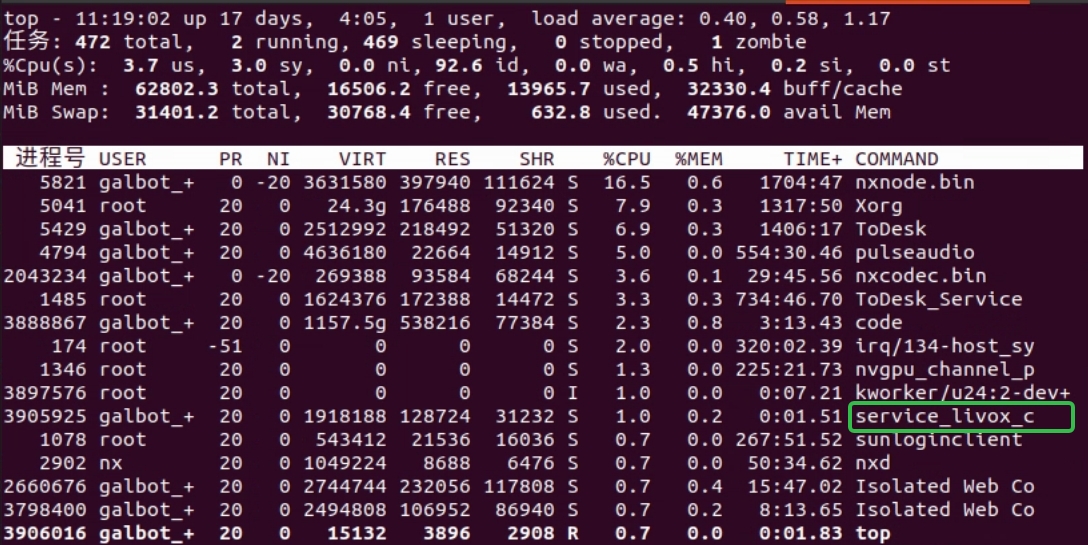
Mapping requires the LiDAR to be running. On the HPU terminal, run top to check whether the LiDAR process is present. If it has been started automatically, you will see a process named service_livox_capture, as shown below:
If the LiDAR is not running, start it with the command below. Do not start it repeatedly.
1.1.2 Ensure the map path is writableThe default map path is /var/maps/. If the path does not exist or you lack permissions, create it and grant write access:
1.2 Start mapping
Press the emergency stop and push the robot to the mapping start point (mapping can begin from any location).
Start mapping:
During normal mapping, the program prints the keyframe count, pose delay (time delay), and the current robot pose (x y z qx qy qz qw). The keyframe count increases as the robot moves and stays unchanged when the robot is stationary, as shown below: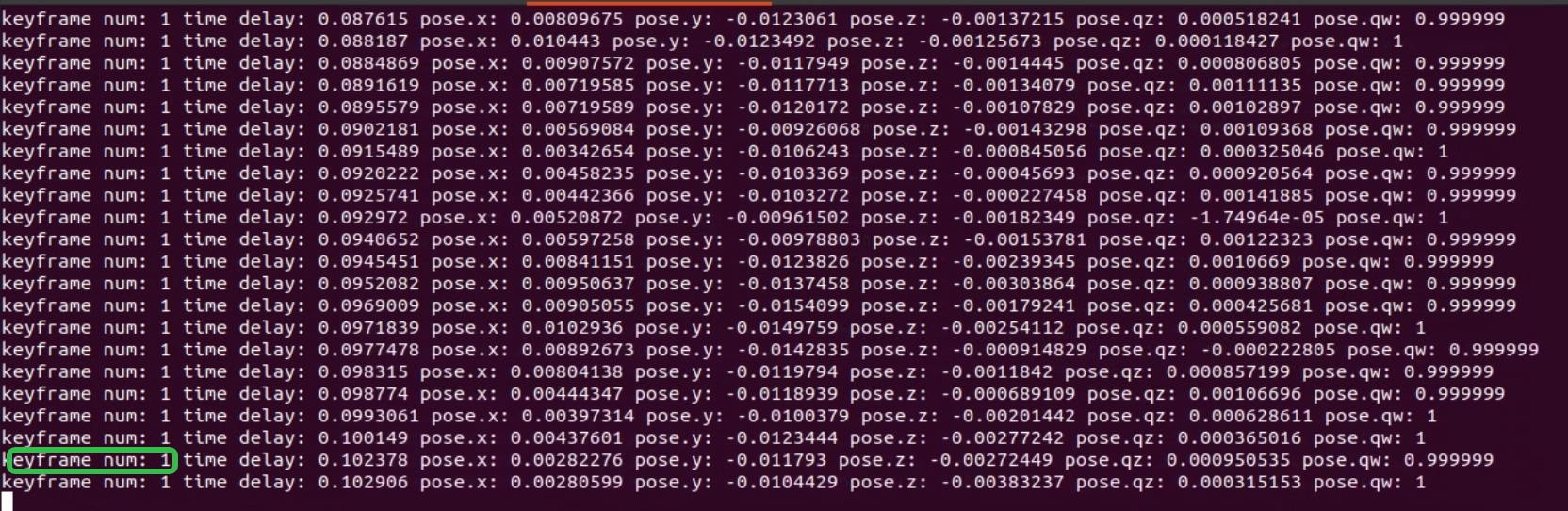
Push the robot around the environment once and then save the map. Avoid excessive acceleration or angular velocity; roughly walking speed is sufficient.
1.3 Save the map
Stopping the mapping program does not save the map automatically. If you need to save the map, do so before closing the mapping program.
Save the map:
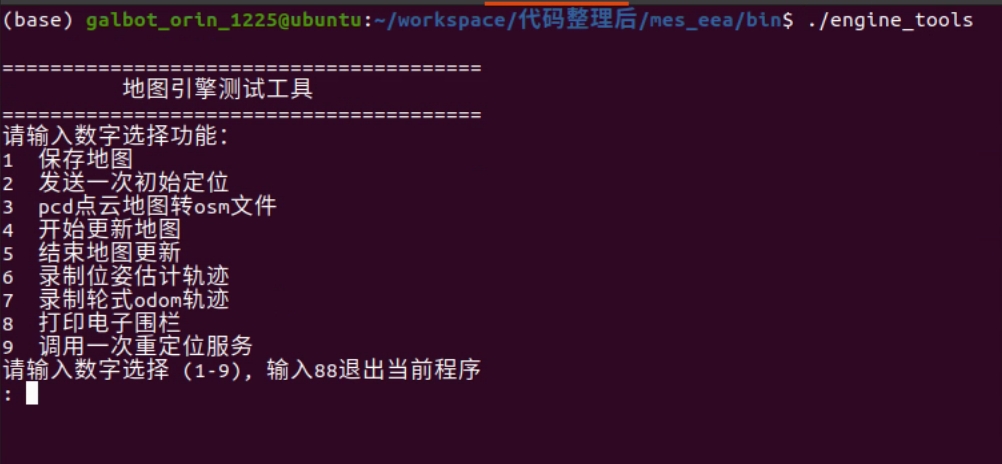
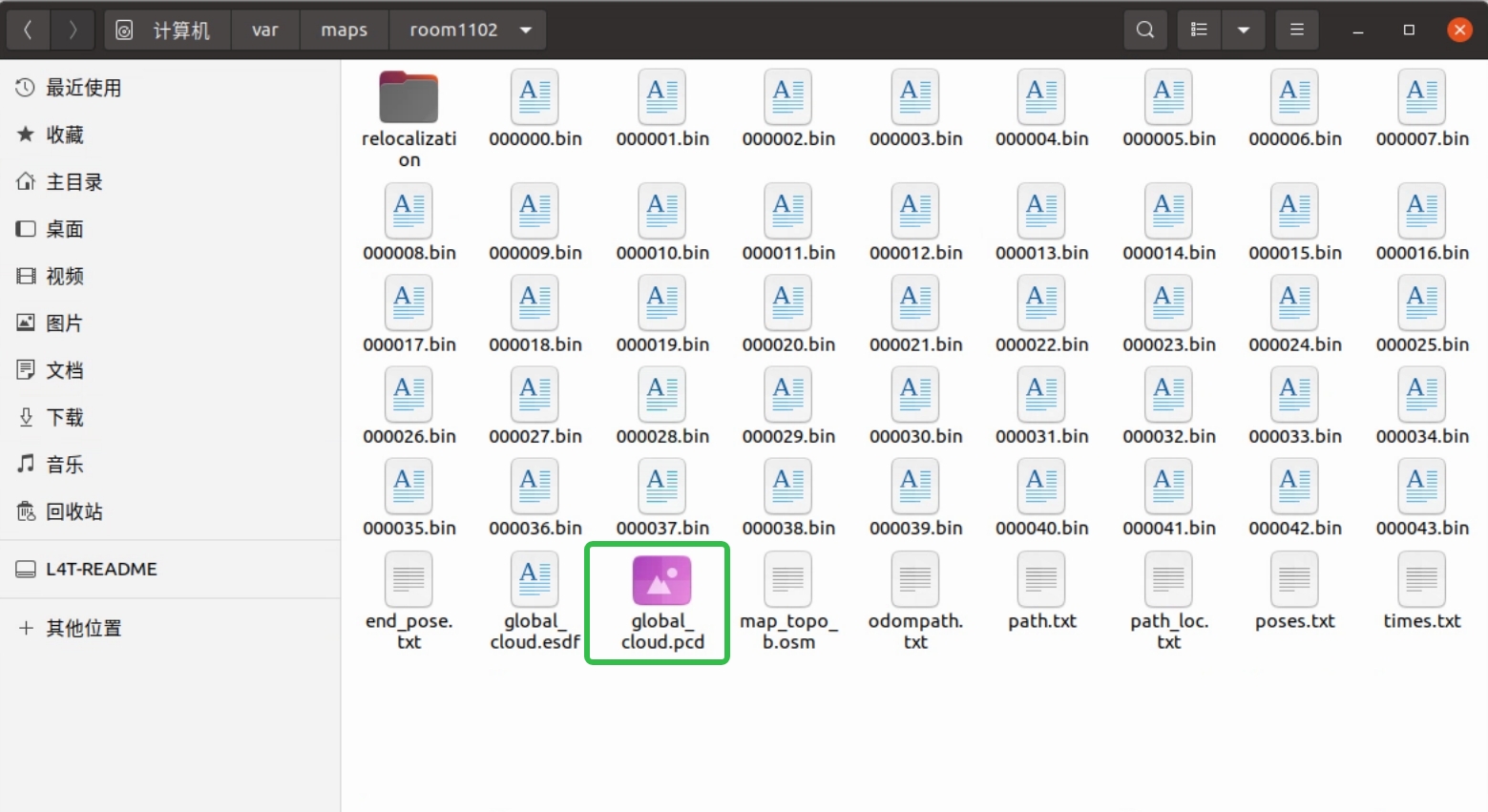
Launch the map saving tool, enter 1, and press Enter to select the save function. The default map path is /var/maps/room1102, as shown below:
1.4 Edit the map
1.4.1 Remove map noise
After mapping, you should inspect and remove noise points to avoid affecting navigation. Check the robot’s operating area from the ground up to 2.5 meters. Ground points do not affect navigation; remove only the floating noise points.
Preparation: download CloudCompare
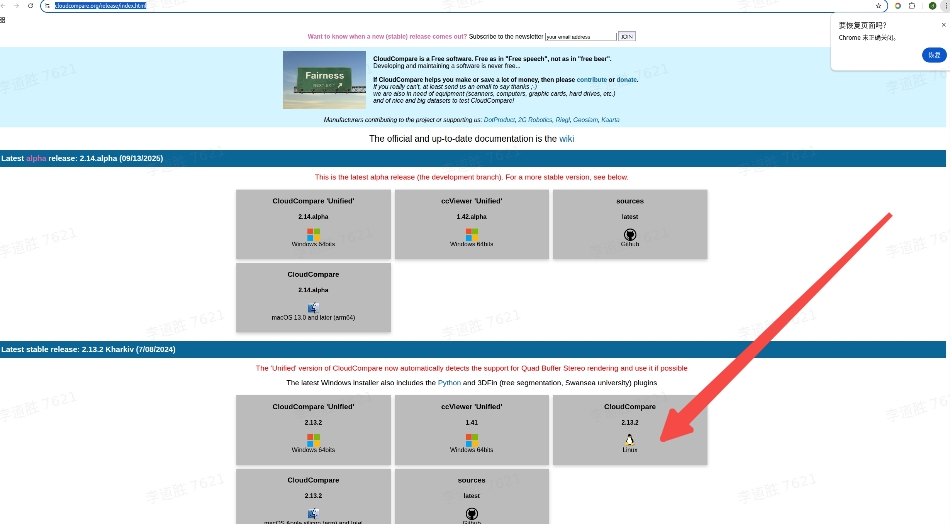
Download link: https://www.cloudcompare.org/release/index.html
See the download page below:
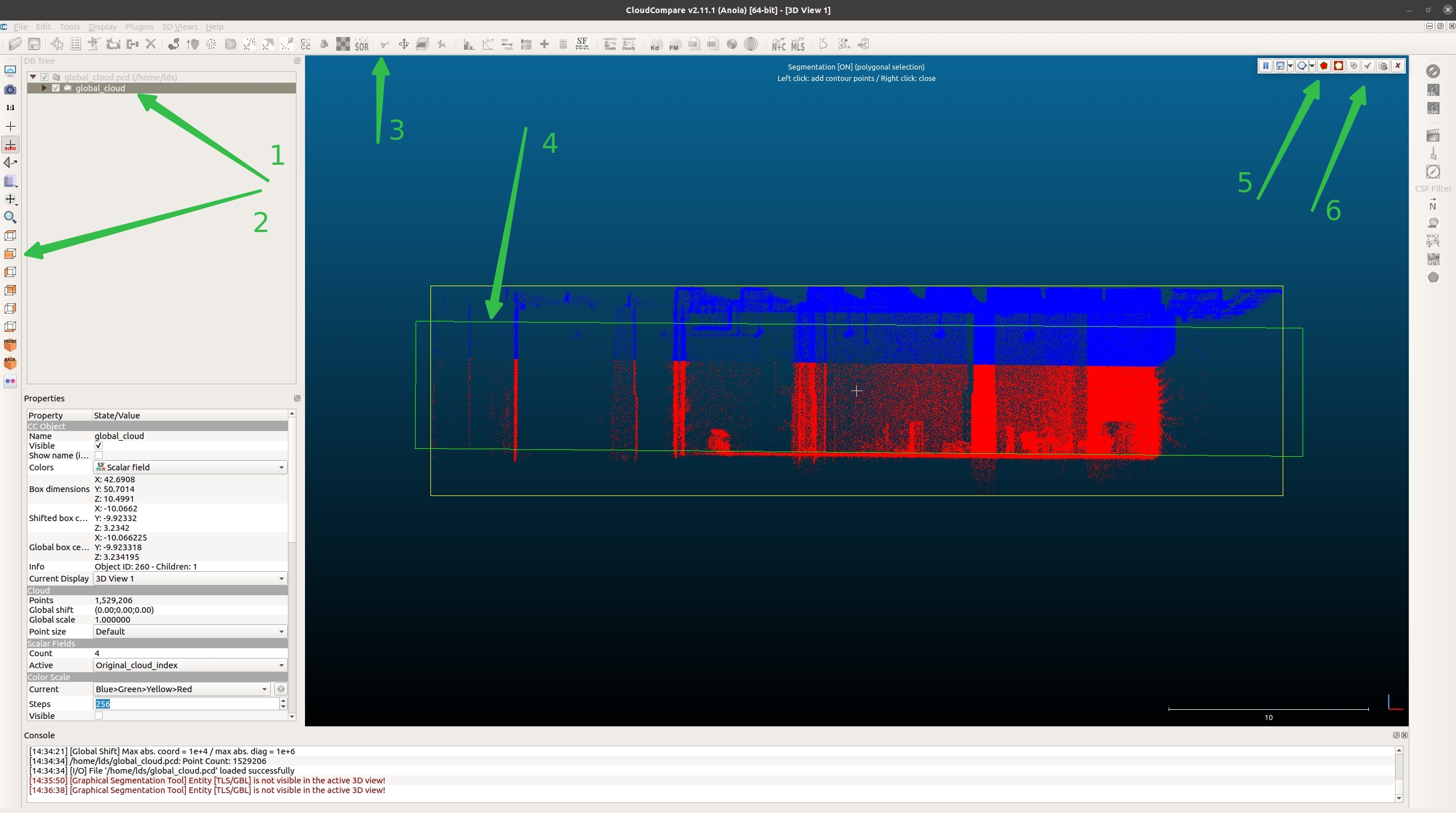
Open CloudCompare and drag the newly created point cloud map global_cloud.pcd into the workspace, as shown below:
The steps correspond to the numbered green arrows in the image below:
Step 1: Check the file.
Step 2: Select the front view.
Step 3: Choose the crop tool (scissors icon).
Step 4: Box-select the target region (between floor and ceiling in the robot’s operating area).
Step 5: Keep the points inside the selection.
Step 6: Confirm the operation (checkmark icon).
The point cloud is now split into two parts: global_cloud.segmented inside the selection and global_cloud.remaining outside, as shown below:
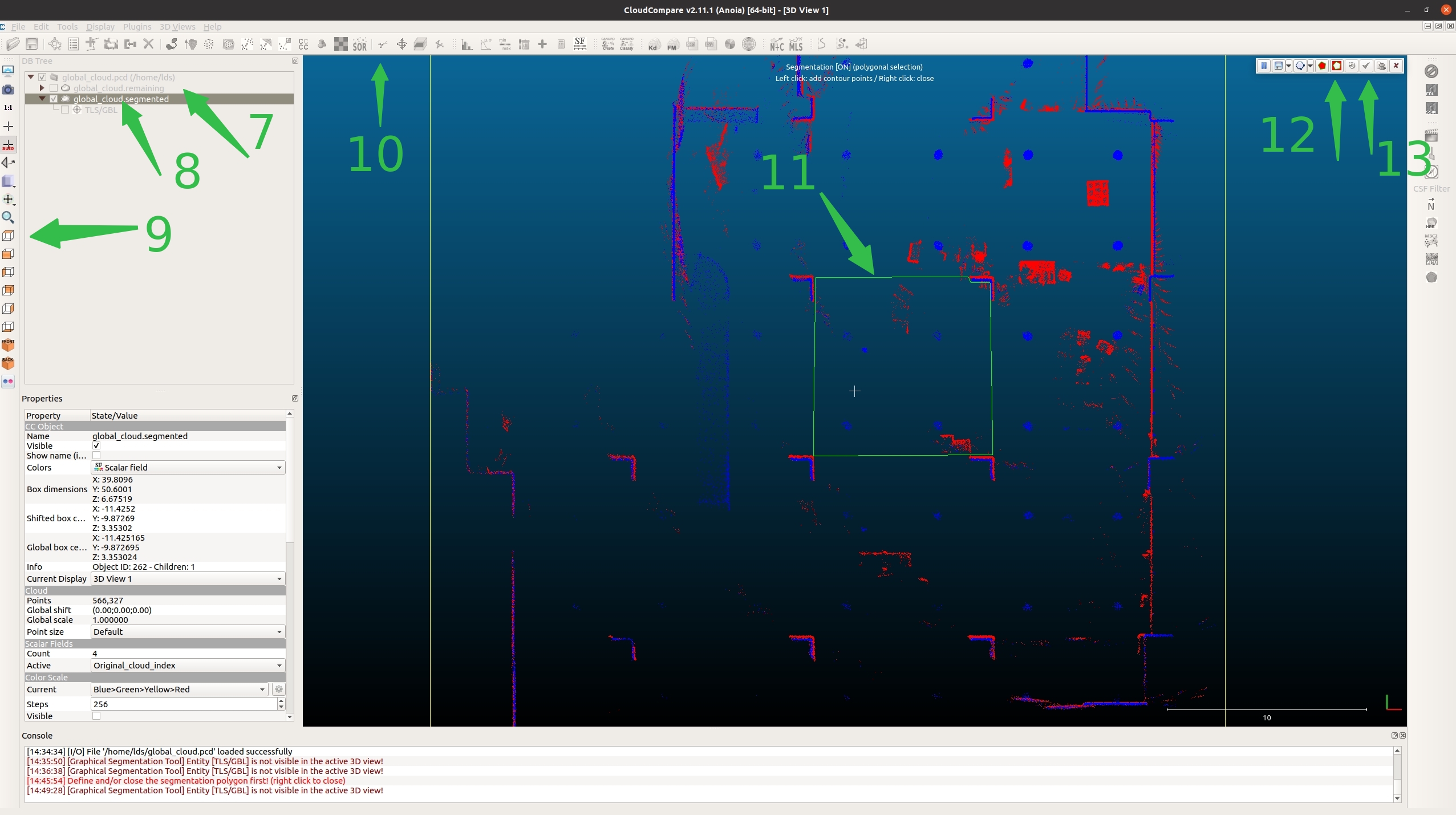
Step 7: Uncheck global_cloud.remaining.
Step 8: Check global_cloud.segmented.
Step 9: Select the top view.
Step 10: Choose the crop tool (scissors icon).
Step 11: Assuming the robot operates within the green box, select that area. Do not include real obstacles (e.g., stacks or tables). You only need to remove noise points.
Step 12: Click the icon outside the box.
Step 13: Confirm the operation.
As shown below:
As shown below, there are now three point clouds. global_cloud.segmented.remaining is noise; click it, then right-click and select Delete. Next, select (Ctrl+click) both global_cloud.remaining and global_cloud.segmented.remaining, as shown below:
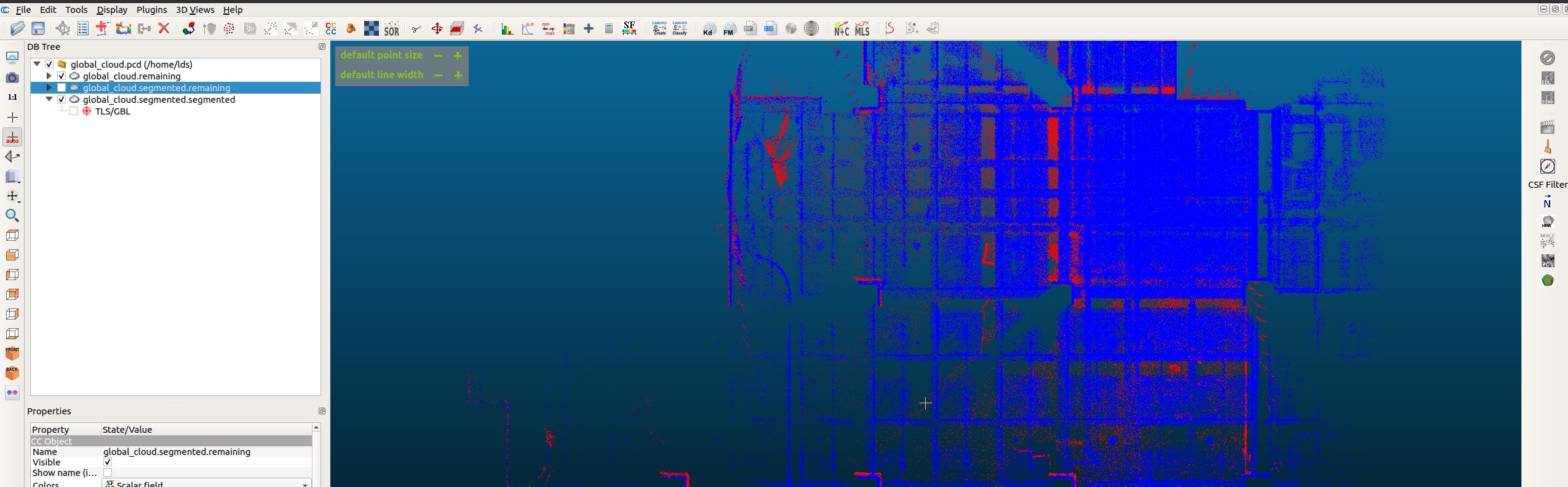
Then choose Edit → Merge (top-left) to merge the two point clouds. Finally, choose File → Save to save the point cloud. Name it global_cloud_cleand, then move global_cloud_cleand.pcd to /var/maps/room1102/, as shown below:
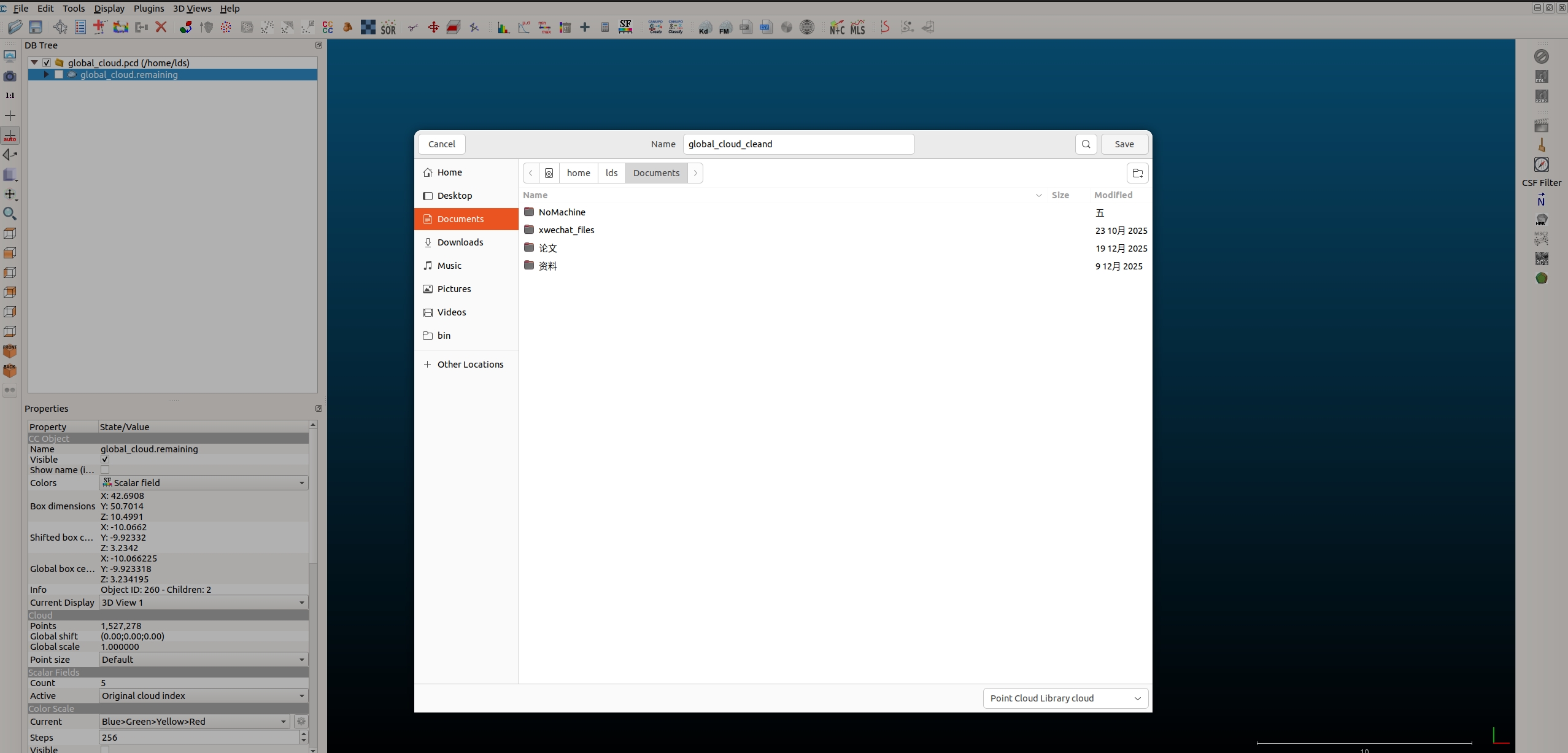
1.4.2 Edit the OSM file (draw geofences)
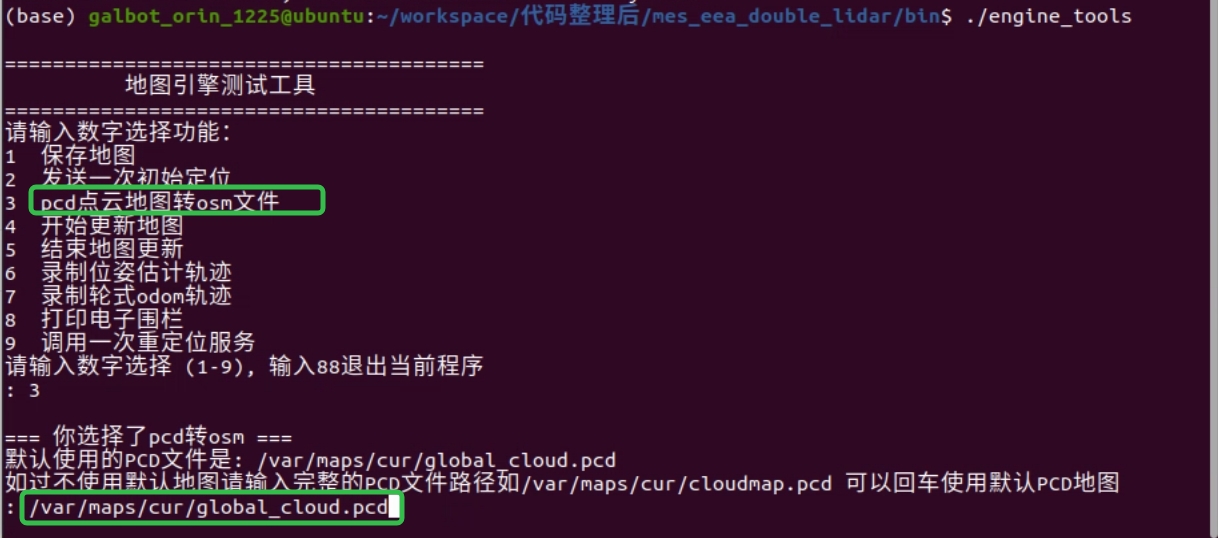
After mapping (assuming the map is saved at /var/maps/room1102/), use engine_tools, enter 3, and choose the point-cloud-to-OSM conversion function.
Press Enter to use the default map. In this example, the map is stored at /var/maps/room1102/, so enter the full path /var/maps/room1102/global_cloud.pcd and press Enter to convert, as shown below:
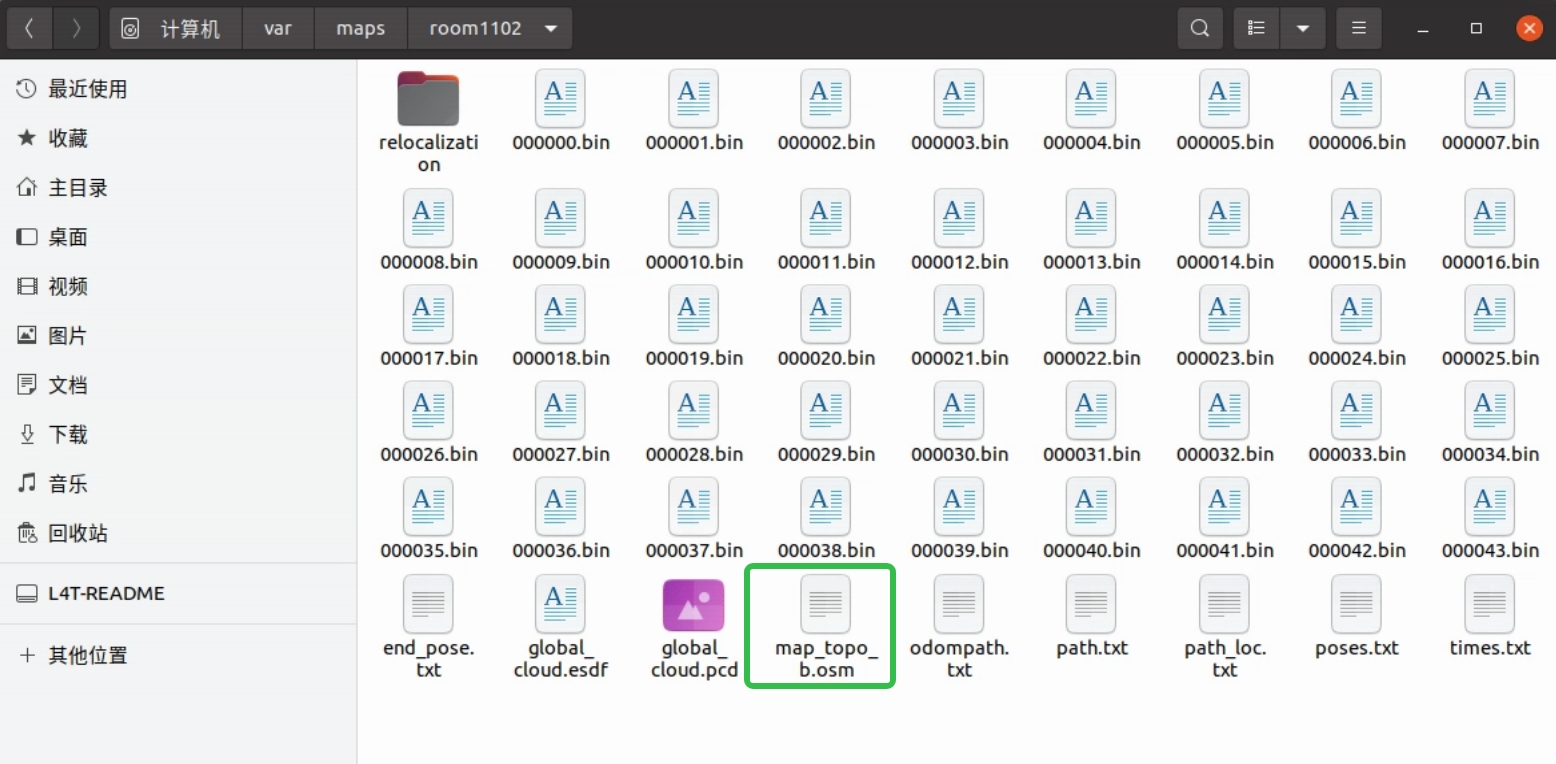
The converted file is highlighted in green below. Open the OSM file with JOSM, as shown below:
If JOSM is not installed, you can install it via apt:
After installation, runjosm in the terminal to open the app.
Step 1: Click File in the top-left corner, choose Open, then locate /var/maps/room1102/map_topo.osm.
Step 2: Select the tool indicated by white arrow 1, then left-click to draw the shape (thin red line), as shown by white arrow 2.
Step 3: After drawing is complete (closed shapes finish automatically; otherwise press Esc), click the small icon above white arrow 1 and select the line you just drew. The selected line turns red. Hold Ctrl to select multiple lines. Then click white arrow 3, as shown below:
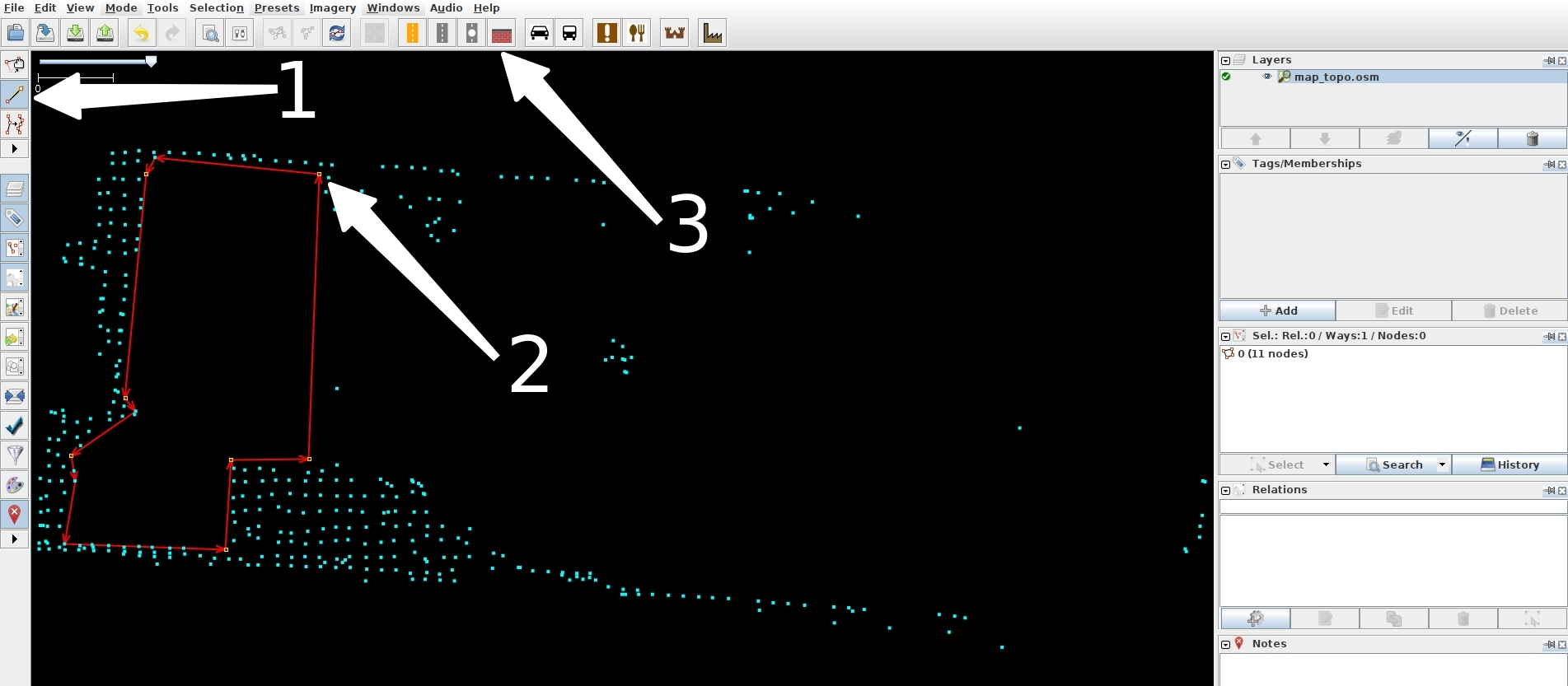
Step 4: In the pop-up, choose the Fence tab, set the type to barbed_wire as indicated by white arrow 4, click Apply Preset, then right-click white arrow 5 and choose Save, as shown below:
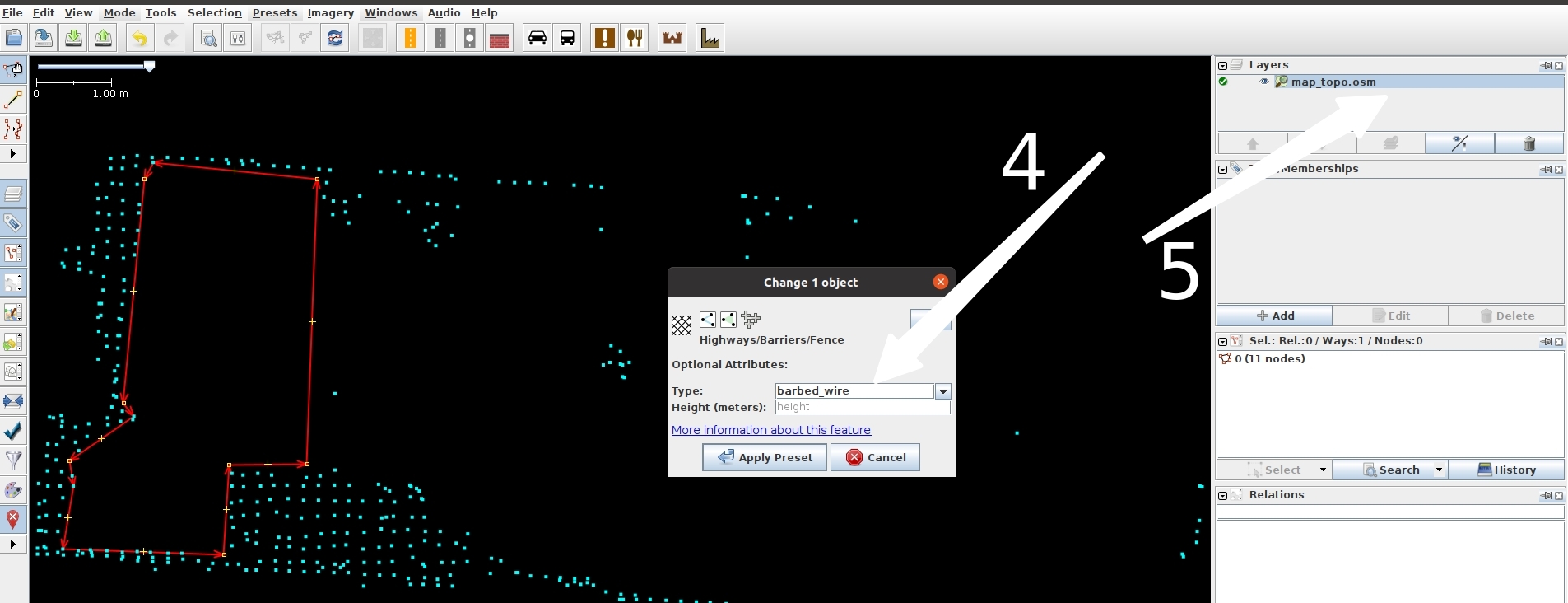
1.5 Map Updates To save computing resources, this feature is disabled by default. You can manually enable map updates and save the updated map yourself.
Step 1: When localization is stable (score > 0.9), enable map update:
Change manager_update_map=0 to manager_update_map=1.Step 2: Restart localization in place. Once the score returns to normal (score > 0.9), run engine_tools and choose Start Map Update.
Step 3: Push the robot around the environment for one full loop, then use engine_tools to select Stop Map Update.
Step 4: The updated map will not overwrite the current localization map (/var/maps/cur). It will be saved to /var/maps/update_map.
Step 5: After finishing the update, change manager_update_map=1 back to 0, then replace the map if needed.
Note: 1. Both parameter changes and map replacement require restarting the localization service to take effect. 2. This example uses engine_tools. If you don’t have it, use /data/galbot/bin/test_start_update_map and /data/galbot/bin/test_stop_update_map instead.
2. Localization
2.1 Prepare the map
Localization requires the LiDAR to be running (it does not depend on the mapping program, so you can close mapping after it finishes).
Localization uses the map path /var/maps/cur. Rename the target map to cur (for example, rename the newly created map room1102 to cur), as shown below:
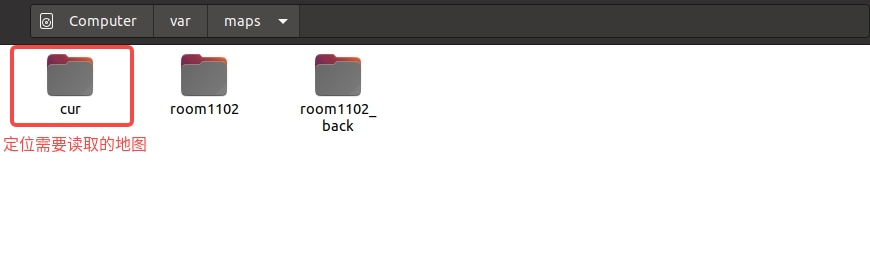
2.2 Start localization
Start localization:
2.3 Check localization status
Check localization status:
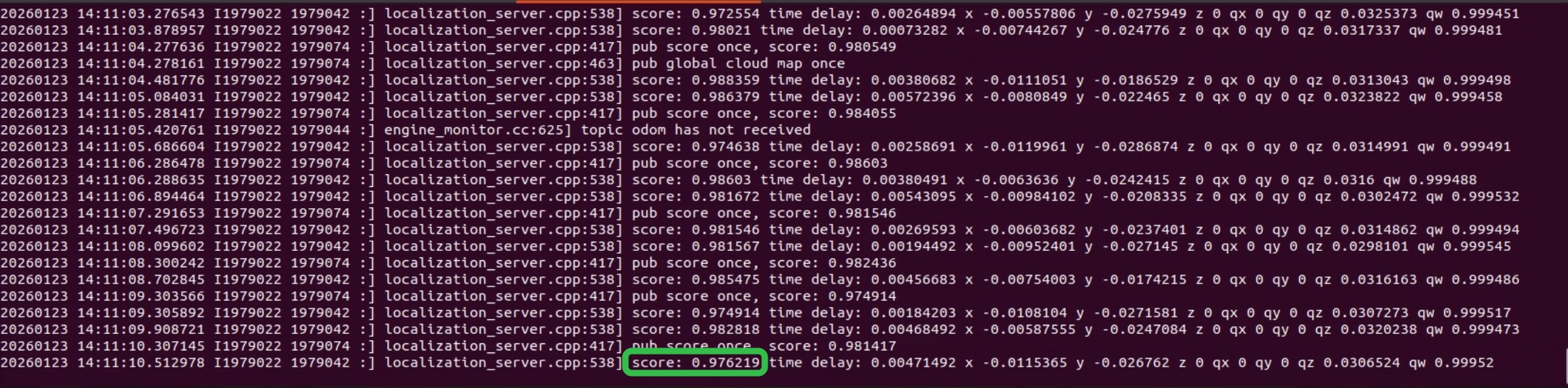
If the score is below 0.75 or no score/pose is published, push the robot to the mapping start pose and send an initial pose once (use engine_tools, enter 2, and press Enter), as shown below:
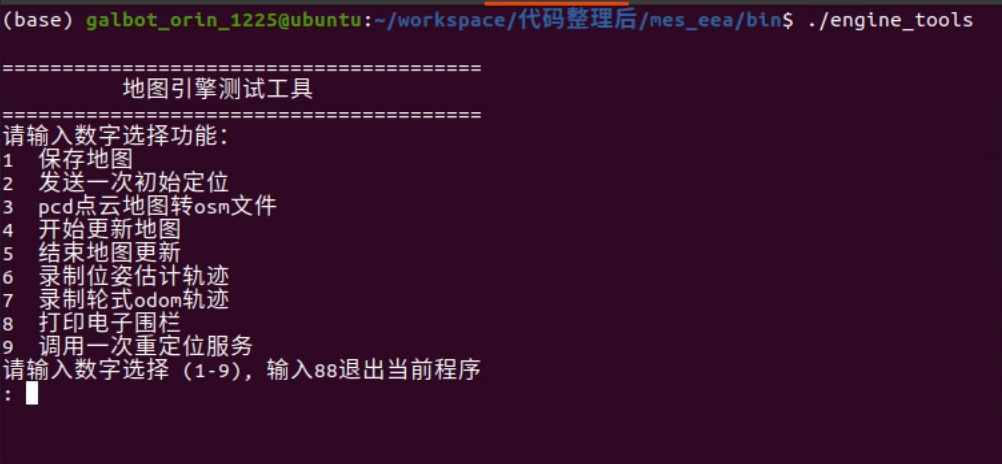
Example4. Sensor Data Acquisition
This example demonstrates the sensor data acquisition functionality of the GALBOT robot. By initializing the robot and enabling sensors such as the left arm camera, depth camera, base lidar, and torso IMU, the program acquires and processes RGB images, depth images, lidar point cloud data, and IMU data. It decodes and visualizes the images, converts and saves point cloud data in PCD format, and implements the fusion of depth images with RGB images to generate colored point clouds.
Note: 1. Keep the emergency stop button in the open state; 2. Ensure there are no obstructions within 2 meters around the robot to avoid dangerous contact between the arms and obstacles.
"""
Note: When running this example, please confirm that the robot's left arm camera driver `/data/galbot/bin/left_arm_camera_capture`
    and radar driver `/data/galbot/bin/service_livox_capture` have been loaded;
"""
try:
    from galbot_sdk.g1  import GalbotRobot, SensorType
except ImportError:
    print("import galbot_sdk failed, please install it first or check if it is in the PYTHONPATH")
    exit(1)

import os

try:
    import open3d as o3d
except ImportError:
    os.system("pip install open3d")
    import open3d as o3d

try:
    import cv2
except ImportError:
    os.system("pip install opencv-python")
    import cv2

try:
    import numpy as np
except ImportError:
    os.system("pip install numpy")
    import numpy as np

import time
from typing import Dict


def convert_pointcloud(cloud):
    """
    Convert cloud dict to NumPy array dictionary

    Parameters:
        cloud (dict): PointCloud2 protobuf message object

    Returns:
        Dictionary: {field_name: NumPy array}
        - Single-element fields: shape (N,)
        - Multi-element fields: shape (N, count) or (N,)
        - N = width * height (total number of points)
    """

    if not cloud:
        return {}

    num_points = cloud["height"] * cloud["width"]
    if num_points == 0:
        return {}

    DTYPE_MAP = {
        1: np.int8,
        2: np.uint8,
        3: np.int16,
        4: np.uint16,
        5: np.int32,
        6: np.uint32,
        7: np.float32,
        8: np.float64
    }
    dtype_list = []
    for field in cloud["fields"]:
        # Get base data type
        np_dtype_class = DTYPE_MAP.get(field["datatype"])
        if np_dtype_class is None:
            raise ValueError(f"Unsupported data type: {field['datatype']}")

        dtype_inst = np.dtype(np_dtype_class)

        # Handle byte order (endianness)
        if dtype_inst.itemsize > 1:
            byteorder = '>' if cloud["is_bigendian"] else '<'
            dtype_inst = dtype_inst.newbyteorder(byteorder)

        # Add to dtype list
        if field["count"] == 1:
            dtype_list.append((field["name"], dtype_inst))
        else:
            # Multi-element fields (e.g., rgb)
            dtype_list.append((field["name"], dtype_inst, field["count"]))

    # Create structured dtype
    dtype = np.dtype(dtype_list)

    # Data integrity check
    expected_size = num_points * cloud["point_step"]
    if len(cloud["data"]) < expected_size:
        raise ValueError(
            f"Insufficient data length: expected {expected_size} bytes, "
            f"actual {len(cloud['data'])} bytes"
        )

    # Create NumPy structured array from binary data
    # count parameter ensures only expected number of points are read
    arr = np.frombuffer(cloud["data"], dtype=dtype, count=num_points)

    # Convert to regular dictionary (copy data to avoid modifying original)
    result = {}
    for field in cloud["fields"]:
        field_data = arr[field["name"]]

        # Handle shape of multi-element fields
        if field["count"] == 1:
            result[field["name"]] = field_data.copy()
        else:
            # Keep original shape or flatten, choose according to needs
            result[field["name"]] = field_data.copy()

    return result


def get_xyz_array(pointcloud_dict: Dict[str, np.ndarray],
                remove_nan: bool = False) -> np.ndarray:
    """
    Extract XYZ coordinate array from converted point cloud dictionary

    Parameters:
        pointcloud_dict (Dict[str, np.ndarray]): Dictionary returned by pointcloud2_to_numpy()
        remove_nan (bool, optional): Whether to remove points containing NaN (for FLOAT32/FLOAT64 types). Defaults to False.

    Returns:
        Nx3 point coordinate array
    """
    required = ['x', 'y', 'z']
    if not all(k in pointcloud_dict for k in required):
        raise ValueError("Point cloud data missing required xyz fields")

    points = np.stack([pointcloud_dict['x'],
                    pointcloud_dict['y'],
                    pointcloud_dict['z']], axis=1)

    if remove_nan:
        mask = ~np.isnan(points).any(axis=1)
        points = points[mask]

    return points

def save_xyz_to_pcd(xyz_array: np.ndarray, filename: str, binary: bool = False) -> None:
    """
    Save XYZ coordinates to PCD file format (simplest option for coordinate-only data)

    Parameters:
        xyz_array (np.ndarray): Nx3 array of XYZ coordinates
        filename (str): Output PCD file path
        binary (bool, optional): If True, saves in binary format; otherwise ASCII. Defaults to False.
    """
    if xyz_array.ndim != 2 or xyz_array.shape[1] != 3:
        raise ValueError(f"xyz_array must have shape (N, 3), got {xyz_array.shape}")

    num_points = xyz_array.shape[0]
    header = [
        "# .PCD v0.7 - Point Cloud Data file format",
        "VERSION 0.7",
        "FIELDS x y z",
        "SIZE 4 4 4",
        "TYPE F F F",  # F = float32
        "COUNT 1 1 1",
        f"WIDTH {num_points}",
        "HEIGHT 1",
        "VIEWPOINT 0 0 0 1 0 0 0",
        f"POINTS {num_points}",
        f"DATA {'binary' if binary else 'ascii'}"
    ]

    if binary:
        with open(filename, 'wb') as f:
            f.write(('\n'.join(header) + '\n').encode('ascii'))
            f.write(xyz_array.astype(np.float32).tobytes())
    else:
        with open(filename, 'w') as f:
            f.write('\n'.join(header) + '\n')
            np.savetxt(f, xyz_array, fmt='%f')


def decode_compressed_image(compressed_image):
    """
    decode CompressedImage image

    Parameters:
        compressed_image (dict): image dict, keys:[header, format, data, "depth_scale"]

    Returns:
        numpy.ndarray: decoded image
    """
    image_data = compressed_image["data"]
    if compressed_image["format"] == "rgb8":
        return decode_rgb_image(image_data)
    elif compressed_image["format"] == "16UC1":
        return decode_depth_image(compressed_image)
    else:
        raise ValueError(f"Unsupport data format: {compressed_image['format']}")

def decode_rgb_image(image_data):
    """decode rgb image"""
    nparr = np.frombuffer(image_data, np.uint8)
    img = cv2.imdecode(nparr, cv2.IMREAD_COLOR)
    if img is None:
        raise ValueError("Fail to Decode RGB Image")
    return img

def decode_depth_image(image_data):
    """decode depth image"""
    depth_img = np.frombuffer(image_data["data"], dtype=np.uint16).copy()

    # Check if height and width exist
    if "height" not in image_data or "width" not in image_data:
        raise ValueError("Missing 'height' or 'width' in depth image metadata.")
    if image_data["height"] == 0 or image_data["width"] == 0:
        raise ValueError(f"Invalid 'height' ({image_data['height']}) or 'width' ({image_data['width']}) in depth image metadata.")

    # Parse depth image
    depth_img = depth_img.reshape((image_data["height"], image_data["width"]))
    depth_img = depth_img.astype(np.float32) / image_data["depth_scale"]

    return depth_img

def depth_rgb_to_pointcloud(depth, rgb, fx, fy, cx, cy, depth_scale=1.0):
    """
    Convert depth map and RGB image to point cloud

    Parameters:
        depth: (H, W) depth map
        rgb:   (H, W, 3) RGB image
        depth_scale: Depth unit scaling (use 0.001 for mm->m conversion)

    Returns:
        points: (N, 3) point cloud coordinate array
        colors: (N, 3) point cloud color array (0-1 range)
    """
    assert depth.shape[:2] == rgb.shape[:2]

    H, W = depth.shape

    # Pixel coordinates
    u, v = np.meshgrid(np.arange(W), np.arange(H))

    # Depth (converted to meters)
    Z = depth.astype(np.float32) * depth_scale

    # Filter invalid depths
    valid = Z > 0

    X = (u - cx) * Z / fx
    Y = (v - cy) * Z / fy

    points = np.stack((X, Y, Z), axis=-1)
    colors = rgb.astype(np.float32) / 255.0

    # Keep only valid points
    points = points[valid]
    colors = colors[valid]

    return points, colors

def check_robot_safety():
    """Check if robot is safe"""
    # Prompt important notes
    print("⚠️  Note: 1. Please ensure the emergency stop button of the robot is released; 2. Please ensure there are no obstructions around the robot to avoid unexpected situations.")
    while True:
        key = input("Please confirm that the robot's emergency stop button is released and there are no obstructions, continue? (y/n)...")
        if key == 'y':
            print("User confirmed, continuing...")
            break
        elif key == 'n':
            print("User did not confirm, exiting program...")
            exit(1)
        else:
            print("Invalid input, please enter 'y' or 'n'")

def main():
    SHOW_IMAGE = False
    check_robot_safety()
    try:
        # Get and initialize the GalbotRobot singleton
        robot = GalbotRobot.get_instance()

        # Get RGB and depth images from the left arm, depth images from the right arm,
        # base LiDAR data, and torso IMU data
        enable_sensor_set = {SensorType.LEFT_ARM_CAMERA, # Left arm depth camera
                            SensorType.LEFT_ARM_DEPTH_CAMERA, # Left arm RGB camera
                            SensorType.BASE_LIDAR,} # Base LiDAR

        # To save resource overhead, only cameras and radar sensors passed during initialization can acquire data
        robot.init(enable_sensor_set)
        print("Initialization successful")
        # Program starts immediately, wait for data readiness
        time.sleep(5)

        # Get RGB image from the left arm
        rgb_image_data = robot.get_rgb_data(SensorType.LEFT_ARM_CAMERA)
        if not rgb_image_data:
            print("No rgb image data!")
        else:
            print("get rgb image suceess")
            print(rgb_image_data['header'])
            img = decode_compressed_image(rgb_image_data)

            # Save RGB image
            cv2.imwrite("rgb_image_data.jpg", img)
            # Visualize RGB image
            if SHOW_IMAGE:
                cv2.namedWindow("rgb image", cv2.WINDOW_NORMAL)
                cv2.imshow("rgb image", img)
                cv2.waitKey(0)
                cv2.destroyAllWindows()

        # Get depth image from the left arm
        depth_data = robot.get_depth_data(SensorType.LEFT_ARM_DEPTH_CAMERA)
        if not depth_data or "data" not in depth_data:
            print("Depth camera not ready")
        else:
            print("get depth data suceess")
            print(depth_data['header'])
            depth_img_raw = decode_compressed_image(depth_data)
            depth_img = cv2.normalize(depth_img_raw, None, 0, 255, cv2.NORM_MINMAX) # Normalize, mapping depth values to 0-1 range
            depth_img = depth_img.astype(np.uint8)

            # Save depth image
            cv2.imwrite("depth_data.jpg", depth_img)
            # Visualize depth image
            if SHOW_IMAGE:
                cv2.namedWindow("depth image", cv2.WINDOW_NORMAL)
                cv2.imshow("depth image", depth_img)
                cv2.waitKey(0)
                cv2.destroyAllWindows()

        # Get base LiDAR data
        lidar_data = robot.get_lidar_data(SensorType.BASE_LIDAR)
        if not lidar_data:
            print("No lidar data!")
        else:
            pointcloud_dict = convert_pointcloud(lidar_data)
            xyz_points = get_xyz_array(pointcloud_dict)
            save_xyz_to_pcd(xyz_points, "output_xyz.pcd")
            print(pointcloud_dict)
            print("get lidar data success")

            # Visualize LiDAR point cloud
            if SHOW_IMAGE:
                vis = o3d.visualization.Visualizer()
                vis.create_window()
                pcd = o3d.geometry.PointCloud()
                pcd.points = o3d.utility.Vector3dVector(xyz_points)
                vis.add_geometry(pcd)
                vis.run()
                vis.destroy_window()

        # Get torso IMU data
        imu_data = robot.get_imu_data(SensorType.TORSO_IMU)
        if not imu_data:
            print("No imu data!")
        else:
            print("get imu data suceess")

        try:
            camera_info = robot.get_camera_intrinsic(SensorType.LEFT_ARM_DEPTH_CAMERA)
            if not camera_info:
                print("No camera info!")
            else:
                print(camera_info)
        except Exception as e:
            camera_info = {
                "width": 1280,
                "height": 720,
                "distortion_model": "plumb_bob",
                "camera_type": "D405",
                "k": [653.4349365234375, 0.0, 639.95159912109375,
                    0.0, 652.48858642578125, 365.29425048828125,
                    0.0, 0.0, 1.0],
            }

        # Convert depth map and RGB image to point cloud and save
        if depth_data and rgb_image_data:
            points, colors = depth_rgb_to_pointcloud(
                depth_img_raw,
                img,
                fx=camera_info['k'][0],
                fy=camera_info['k'][4],
                cx=camera_info['k'][2],
                cy=camera_info['k'][5],
                depth_scale=0.1   # If depth is in mm, set to 0.001
            )
            save_xyz_to_pcd(points, "left_arm_camera_pointcloud.pcd", binary=True)
            print(f"RGB fused depth map point cloud saved to left_arm_camera_pointcloud.pcd, number of points: {points.shape[0]}")
    except Exception as e:
        print(f"❌ Exception occurred: {e}")
    finally:
        # Actively send SIGINT exit signal
        robot.request_shutdown()
        # Wait to enter shutdown state
        robot.wait_for_shutdown()
        # Release SDK resources
        robot.destroy()
        print('Resource release successful')


if __name__=="__main__":
    main()
Example5. Object Grasping and Placement
This example demonstrates the robot's object grasping and placement functionality. After executing this program, the robot will move to approximately 1 meter to its left rear and attempt to grasp an object in the air. By initializing the robot, navigation, motion control instances, and multiple sensors, the program first navigates to the target area, then raises the camera to an appropriate height, uses the vision system to detect the target object and convert its pose to the chassis coordinate system, then controls the robotic arm to move to the target position for grasping. After completing the grasp, it navigates back to the initial position and places the object down. The entire process integrates multiple functions including navigation, visual recognition, robotic arm control, and gripper operation.
Note: 1. Keep the emergency stop button in the open state; 2. Ensure there are no obstructions within 2 meters around the robot to avoid dangerous contact between the arms and obstacles.
"""
Note: When running this example, please confirm that the robot's motion control service `/data/galbot/bin/service_motion_plan`,
    robot state publishing service `/data/galbot/bin/robot_state_publish`,
    navigation service `/data/galbot/bin/service_navigation_plan`
    and hand-eye calibration publishing service `/data/galbot/bin/eyehand_calib_publish` have been loaded;
"""
try:
    import galbot_sdk.g1 as gm
    from galbot_sdk.g1  import GalbotNavigation, GalbotRobot, GalbotMotion, JointGroup, SensorType
except ImportError:
    print("Import galbot_sdk failed, please install it first or check if it is in the PYTHONPATH")
    exit(1)

import os

try:
    import numpy as np
except ImportError:
    os.system("pip install numpy")
    import numpy as np

try:
    from scipy.spatial.transform import Rotation as R
except ImportError:
    os.system("pip install scipy")
    from scipy.spatial.transform import Rotation as R

try:
    import cv2
except ImportError:
    os.system("pip install opencv-python")
    import cv2

import time
from typing import Sequence

def decode_compressed_image(compressed_image, camera_info={}):
    """
    decode CompressedImage image

    Parameters:
        compressed_image (dict): image dict, keys:[header, format, data, "depth_scale"]

    Returns:
        numpy.ndarray: decoded image
    """
    image_data = compressed_image["data"]
    if compressed_image["format"] == "rgb8":
        return decode_rgb_image(image_data)
    elif compressed_image["format"] == "16UC1":
        return decode_depth_image(image_data, compressed_image["depth_scale"], camera_info)
    else:
        raise ValueError(f"Unsupport data format: {compressed_image['format']}")

def decode_rgb_image(image_data):
    """decode rgb image"""
    nparr = np.frombuffer(image_data, np.uint8)
    img = cv2.imdecode(nparr, cv2.IMREAD_COLOR)
    if img is None:
        raise ValueError("Fail to Decode RGB Image")
    return img

def decode_depth_image(image_data, depth_scale, camera_info):
    """decode depth image"""
    depth_img = np.frombuffer(image_data, dtype=np.uint16).copy()

    if not camera_info:
        depth_img = depth_img.reshape((720, 1280))
    else:
        depth_img = depth_img.reshape((camera_info["height"], camera_info["width"]))
    depth_img = depth_img.astype(np.float32) / depth_scale

    return depth_img

def print_gripper_state(joint_group, gripper_state):
    """
    Print gripper state

    Parameters:
        joint_group (JointGroup): JointGroup enum
        gripper_state (object): Contains timestamp_ns, width, velocity, effort, is_moving
    """
    print(f"Timestamp (ns): {gripper_state.timestamp_ns}")
    print(
        f"width {gripper_state.width} "
        f"velocity {gripper_state.velocity} "
        f"effort {gripper_state.effort} "
        f"is moving {gripper_state.is_moving}"
    )

def get_navigation_pose(object_goal_pose: Sequence[float], motion: GalbotMotion, arm: str = "left_arm"):
    """
    Get navigation target pose

    Parameters:
        object_goal_pose (Sequence[float]): Target pose [x, y, z, qx, qy, qz, qw]
        motion (GalbotMotion): Motion control instance
        arm (str, optional): End effector name. Defaults to "left_arm".

    Returns:
        Sequence[float]: Navigation target pose [x, y, z, qx, qy, qz, qw]
    """
    assert arm in ["left_arm", "right_arm"], "arm must be left_arm or right_arm"

    try:
        status, ee_pose_in_base = motion.get_end_effector_pose(
            end_effector_frame=f"{arm}_end_effector_mount_link",
            reference_frame="base_link"
        )
        if status != gm.MotionStatus.SUCCESS:
            print(f"Failed to get end effector pose: status={status}")
            offset_y = ee_pose_in_base[1]
        else:
            print(f"Successfully got end effector pose: pose={ee_pose_in_base}")
            offset_y = 0.3

        # Set chassis pose to the same z coordinate as the target pose
        base_goal_pose_mat = np.eye(4)
        base_goal_pose_mat[:3, :3] = R.from_quat(object_goal_pose[3:]).as_matrix()
        base_goal_pose_mat[:3, 3] = np.array([object_goal_pose[0], object_goal_pose[1], 0])

        # According to the relative position of the chassis and camera, move the camera navigation target 0.6m backward in the local coordinate to leave observation space for the camera
        base_goal_pose_mat = base_goal_pose_mat @ np.array([[1,0,0,-0.6],[0,1,0,-offset_y],[0,0,1,0],[0,0,0,1]])
        print(base_goal_pose_mat)

        base_goal_pose_quat = R.from_matrix(base_goal_pose_mat[:3, :3]).as_quat()
        base_goal_pose_pos = base_goal_pose_mat[:3, 3]

        return base_goal_pose_pos.tolist() + base_goal_pose_quat.tolist()

    except Exception as e:
        print("Failed to get navigation target pose:", e)


def navigation_to_goal(nav: GalbotNavigation, goal_pose: Sequence[float], retry_cnt: int = 3):
    """
    Navigate to target pose

    Parameters:
        nav (GalbotNavigation): Navigation instance
        goal_pose (Sequence[float]): Target pose [x, y, z, qx, qy, qz, qw]
        retry_cnt (int, optional): Number of retries. Defaults to 3.
    """
    try:
        cur_pose = nav.get_current_pose()
        print(f"Current pose: {cur_pose}")
        if nav.check_path_reachability(goal_pose, cur_pose):
            retry_cnt = 3
            while True:
                status = nav.navigate_to_goal(goal_pose, enable_collision_check=True, is_blocking=True, timeout=20)
                time.sleep(0.5)
                retry_cnt -= 1
                if nav.check_goal_arrival() or retry_cnt < 0:
                    break
                else:
                    print(f"Navigation failed: status={status}, retrying: {retry_cnt}")
            print("navigate_to_goal return status:", status)
            print("Has arrived:", nav.check_goal_arrival())
        else:
            print("Path unreachable or unsafe")
    except Exception as e:
        print(f"Exception occurred during navigation: {e}")

def lift_camera_up(motion: GalbotMotion, target_pose: Sequence[float], target_chain: str, reference_frame: str):
    """
    Lift camera to target height

    Parameters:
        motion (GalbotMotion): Motion control instance
        target_pose (Sequence[float]): Target pose [x, y, z, qx, qy, qz, qw]
        target_chain (str): End effector name
        reference_frame (str): Reference frame
    """
    try:
        retry_cnt = 3
        while True:
            status, cur_ee_pose = motion.get_end_effector_pose_on_chain(
                chain_name=target_chain,
                frame_id="EndEffector",
                reference_frame=reference_frame
            )
            time.sleep(0.5)
            retry_cnt -= 1

            if status == gm.MotionStatus.SUCCESS or retry_cnt < 0:
                print(f"Current end effector pose: {cur_ee_pose}")
                break
            else:
                print(f"Failed to get end effector pose: status={status}, retrying: {retry_cnt}")

        tgt_ee_pose = cur_ee_pose.copy()
        tgt_ee_pose[2] = target_pose[2] - 0.1
        print(f"Target end effector pose: {tgt_ee_pose}")

        retry_cnt = 3
        while True:
            status = motion.set_end_effector_pose(
                target_pose=tgt_ee_pose,
                end_effector_frame=target_chain,
                reference_frame=reference_frame,
                enable_collision_check=False,
                is_blocking=True,
                timeout=5.0,
                params=gm.Parameter()
            )
            time.sleep(0.5)
            retry_cnt -= 1
            if status == gm.MotionStatus.SUCCESS or retry_cnt < 0:
                print(f"✅ Successfully set end effector pose: status={status}")
                break
            else:
                print(f"Failed to set end effector pose: status={status}, retrying: {retry_cnt}")
    except Exception as e:
        print(f"❌ Failed to lift camera: {e}")

def detect_target(img: np.ndarray, depth_img: np.ndarray) -> Sequence[float]:
    """
    Detection target function. Input RGB image and depth image, output target pose.

    Parameters:
        img (np.ndarray): RGB image
        depth_img (np.ndarray): Depth image

    Returns:
        Sequence[float]: Target pose [x, y, z, qx, qy, qz, qw]
    """
    try:

        ############### NOTE ###############
        # This function is a placeholder. In a real-world scenario, you would implement
        # target detection using computer vision techniques. For this example, we assume
        # a default pose.
        ####################################

        # Assume detected target pose is [-0.05, -0.1, 0.12, 0.0, 0.0, 0.0, 1.0]
        # Indicates the target is 0.12m in front of the camera, 0.05m to the left, 0.1m in height, facing the default camera direction
        default_pose = [-0.05, -0.1, 0.12, 0.0, 0.0, 0.0, 1.0]

        return default_pose
    except Exception as e:
        print(f"Target detection exception: {e}")
        return None

def pose_camera_to_base(robot: GalbotRobot, pose_camera: Sequence[float]) -> Sequence[float]:
    """
    Transform camera pose to chassis coordinate system

    Parameters:
        robot (GalbotRobot): Robot instance
        pose_camera (Sequence[float]): Camera pose [x, y, z, qx, qy, qz, qw]

    Returns:
        Sequence[float]: Chassis pose [x, y, z, qx, qy, qz, qw]
    """
    source_frame="left_arm_camera_color_optical_frame"
    target_frame="base_link"
    base_to_cam = robot.get_transform(target_frame, source_frame)[0]
    if base_to_cam is None:
        print("Failed to get transform from camera to chassis")
        return None
    else:
        print("base_to_cam: ", base_to_cam)

    base_to_cam_mat = np.eye(4)
    base_to_cam_mat[:3, :3] = R.from_quat(base_to_cam[3:]).as_matrix()
    base_to_cam_mat[:3, 3] = np.array(base_to_cam[:3])

    pose_camera_mat = np.eye(4)
    pose_camera_mat[:3, :3] = R.from_quat(pose_camera[3:]).as_matrix()
    pose_camera_mat[:3, 3] = np.array(pose_camera[:3])

    pose_base_mat = base_to_cam_mat @ pose_camera_mat[:, 3:]
    print("pose_base_mat: ", pose_base_mat)

    return pose_base_mat.flatten()[:3].tolist() + [0, 0, 0, 1]

def detect_object(robot: GalbotRobot, arm: str = "left_arm"):
    try:
        # Get camera image data
        if arm == "left_arm":
            rgb_image_data = robot.get_rgb_data(SensorType.LEFT_ARM_CAMERA)
            depth_data = robot.get_depth_data(SensorType.LEFT_ARM_DEPTH_CAMERA)
        elif arm == "right_arm":
            rgb_image_data = robot.get_rgb_data(SensorType.RIGHT_ARM_CAMERA)
            depth_data = robot.get_depth_data(SensorType.RIGHT_ARM_DEPTH_CAMERA)
        else:
            raise ValueError("arm must be left_arm or right_arm")

        # Decode image data
        if not rgb_image_data:
            print("No rgb image data!")
        else:
            print("get rgb image suceess")
            img = decode_compressed_image(rgb_image_data)

        if not depth_data:
            print("No depth_data!")
        else:
            depth_img = decode_compressed_image(depth_data)
            print("get depth data suceess")

        # Detect target
        object_pose_camera = detect_target(img, depth_img)
        if object_pose_camera is None:
            print("Target detection failed")
            return None
        else:
            print(f"object_pose_camera: {object_pose_camera}")

        # Calculate target pose in chassis coordinate system
        object_pose_base = pose_camera_to_base(robot, object_pose_camera)
        print(f"Target pose in chassis coordinate system: {object_pose_base}")

    except Exception as e:
        print(f"Target detection exception: {e}")

    return object_pose_base

def check_robot_safety():
    """Check if robot is safe"""
    # Prompt important notes
    print("⚠️  Note: 1. Please ensure the emergency stop button of the robot is released; 2. Please ensure there are no obstructions around the robot to avoid unexpected situations. 3. Please ensure the area around the robot is clear of obstacles.")
    while True:
        key = input("Please confirm that the robot's emergency stop button is released and there are no obstructions, continue? (y/n)...")
        if key == 'y':
            print("User confirmed, continuing...")
            break
        elif key == 'n':
            print("User did not confirm, exiting program...")
            exit(1)
        else:
            print("Invalid input, please enter 'y' or 'n'")

def pick_and_place(robot: GalbotRobot,
                   nav: GalbotNavigation,
                   motion: GalbotMotion,
                   object_pose_base: Sequence[float],
                   target_chain: str,
                   reference_frame: str):
    try:
        # Open left gripper
        # Set left gripper width to 0.1m, speed to 0.05m, force to 10N, will block until gripper reaches position
        status = robot.set_gripper_command(
            JointGroup.LEFT_GRIPPER, 0.1, 0.05, 10, True
        )
        time.sleep(0.5)

        print("object_pose_base: ", object_pose_base)

        # Reach to target position
        retry_cnt = 3
        while True:
            status = motion.set_end_effector_pose(
                target_pose=object_pose_base,
                end_effector_frame=target_chain,
                reference_frame=reference_frame,
                enable_collision_check=False,
                is_blocking=True,
                timeout=5.0,
                params=gm.Parameter()
            )
            time.sleep(1)
            retry_cnt -= 1
            if status == gm.MotionStatus.SUCCESS or retry_cnt < 0:
                break
            else:
                print(f"Failed to set end effector pose: status={status}, retry count: {retry_cnt}")

        assert status == gm.MotionStatus.SUCCESS, "Failed to set end effector pose"
        print(f"✅ Successfully set end effector pose: status={status}")

        # Close gripper to grasp object
        status = robot.set_gripper_command(
            JointGroup.LEFT_GRIPPER, 0.02, 0.05, 10, True
        )
        time.sleep(0.5)

        # Return to initial position
        navigation_to_goal(nav, [0, 0, 0, 0, 0, 0, 1])
        time.sleep(2)

        # Release target
        status = robot.set_gripper_command(
            JointGroup.LEFT_GRIPPER, 0.1, 0.05, 10, True
        )
        time.sleep(0.5)
    except Exception as e:
        print(f"Exception occurred during pick_and_place: {e}")
        return None


def main():
    check_robot_safety()
    try:
        # Get robot instance
        robot = GalbotRobot.get_instance()
        # Get GalbotMotion instance
        motion = GalbotMotion.get_instance()
        # Get navigation instance
        nav = GalbotNavigation.get_instance()

        # Get RGB and depth images from left arm, depth images from right arm,
        # base LiDAR data, and torso IMU data
        enable_sensor_set = {SensorType.LEFT_ARM_CAMERA, # Left arm depth camera
                            SensorType.LEFT_ARM_DEPTH_CAMERA, # Left arm RGB camera
                            SensorType.BASE_LIDAR, # Base LiDAR
                            SensorType.TORSO_IMU} # Torso IMU sensor

        # Initialize robot
        if robot.init(enable_sensor_set):
            print("GalbotRobot initialization successful")
        else:
            print("GalbotRobot initialization failed")
        if motion.init():
            print("GalbotMotion initialization successful")
        else:
            print("GalbotMotion initialization failed")
        if nav.init():
            print("GalbotNavigation initialization successful")
        else:
            print("GalbotNavigation initialization failed")

        # Program starts immediately, wait for data readiness
        time.sleep(1)

        # Calculate navigation target pose
        object_goal_pose = [-1, 0.33, 0.90, 0, 0, 1, 0]
        base_goal_pose = [0, 0, 0, 0, 0, 0, 1]
        base_goal_pose = get_navigation_pose(object_goal_pose, motion)

        # Navigate to target pose
        navigation_to_goal(nav, base_goal_pose)

        target_chain = "left_arm"
        reference_frame = "base_link"

        # Get current end effector pose for subsequent restoration
        try:
            status, original_pose = motion.get_end_effector_pose_on_chain(
                chain_name=target_chain,
                frame_id="EndEffector",
                reference_frame=reference_frame
            )
            assert status == gm.MotionStatus.SUCCESS, "Failed to get end effector pose"
            print(f"✅ Successfully got {target_chain} end effector pose: {original_pose}")
            time.sleep(1)
        except Exception as e:
            print(f"❌ {target_chain} end effector pose exception: {e}")

        # Lift camera
        lift_camera_up(motion, object_goal_pose, "left_arm", "base_link")

        # Detect target
        object_pose_base = detect_object(robot, arm="left_arm")
        if object_pose_base is None:
            print("Target detection failed")
            return None
        else:
            print(f"Detected target pose: {object_pose_base}")

        # Grasp and return to initial position
        pick_and_place(robot, nav, motion, object_pose_base, "left_arm", "base_link")

        # After grasping target, restore posture
        try:
            time.sleep(2)
            status = motion.set_end_effector_pose(
                target_pose=original_pose,
                end_effector_frame=target_chain,
                reference_frame=reference_frame,
                enable_collision_check=False,
                is_blocking=True,
                timeout=5.0,
                params=gm.Parameter()
            )
            assert status == gm.MotionStatus.SUCCESS, "Failed to set end effector pose"
            print(f"✅ Successfully set end effector pose: status={status}")
            time.sleep(1)
        except Exception as e:
            print(f"❌ {target_chain} end effector pose exception: {e}")

    except Exception as e:
        print(f"Exception occurred: {e}")
    finally:
        # Actively send SIGINT exit signal
        robot.request_shutdown()
        # Wait to enter shutdown state
        robot.wait_for_shutdown()
        # Release SDK resources
        robot.destroy()
        print('Resource release successful')

if __name__ == "__main__":
    main()
Example6. Execute simulated VLA results
This example demonstrates the execution of a VLA (Vision-Language-Action) model, aiming to show how to drive the robot to perform corresponding actions using visual sensor data. The script first initializes the robot system and enables multiple camera sensors, then acquires and decodes visual data, generating motion trajectories for various parts of the robot (legs, head, arms) through a simulated VLA model (fake_vla function). Subsequently, collision detection ensures safety before executing these trajectories. When running this script, the robot first performs a safety check, followed by joints moving according to predetermined trajectories. During execution, you can observe the robot's components moving along predetermined paths, ultimately completing a series of coordinated motion sequences while outputting execution status and joint state information.
Note: 1. Keep the emergency stop button in the open state; 2. Ensure there are no obstructions within 2 meters around the robot to avoid dangerous contact between the arms and obstacles.
"""
Note: When running this example, please ensure the robot's `emergency stop button` is released;
"""
import time
import os
from typing import List, Dict, Any

try:
    import galbot_sdk.g1 as gm
    from galbot_sdk.g1 import (
        GalbotRobot, GalbotMotion, GalbotNavigation,
        SensorType, JointGroup, ControlStatus,
        Trajectory, TrajectoryPoint, JointCommand
    )
except ImportError:
    print("Failed to import galbot_sdk, please install it first or check if it is in PYTHONPATH")
    exit(1)

try:
    import cv2
except ImportError:
    os.system("pip install opencv-python")
    import cv2

try:
    import numpy as np
except ImportError:
    os.system("pip install numpy")
    import numpy as np


def decode_compressed_image(compressed_image: Dict[str, Any]) -> np.ndarray:
    """
    Decode CompressedImage image.

    Parameters:
        compressed_image (dict): image dict, keys: [header, format, data, "depth_scale"]

    Returns:
        numpy.ndarray: decoded image
    """
    image_data = compressed_image["data"]
    if compressed_image["format"] == "rgb8":
        return decode_rgb_image(image_data)
    elif compressed_image["format"] == "16UC1":
        return decode_depth_image(image_data)
    else:
        raise ValueError(f"Unsupported data format: {compressed_image['format']}")


def decode_rgb_image(image_data: bytes) -> np.ndarray:
    """
    Decode RGB image.

    Parameters:
        image_data (bytes): Raw image data

    Returns:
        numpy.ndarray: Decoded RGB image
    """
    nparr = np.frombuffer(image_data, np.uint8)
    img = cv2.imdecode(nparr, cv2.IMREAD_COLOR)
    if img is None:
        raise ValueError("Failed to decode RGB Image")
    return img


def decode_depth_image(image_data: Dict[str, Any]) -> np.ndarray:
    """
    Decode depth image.

    Parameters:
        image_data (dict): Depth image data with metadata

    Returns:
        numpy.ndarray: Decoded depth image
    """
    depth_img = np.frombuffer(image_data["data"], dtype=np.uint16).copy()

    # Check if height and width exist
    if "height" not in image_data or "width" not in image_data:
        raise ValueError("Missing 'height' or 'width' in depth image metadata.")
    if image_data["height"] == 0 or image_data["width"] == 0:
        raise ValueError(
            f"Invalid 'height' ({image_data['height']}) or 'width' ({image_data['width']}) in depth image metadata."
        )

    # Parse depth image
    depth_img = depth_img.reshape((image_data["height"], image_data["width"]))
    depth_img = depth_img.astype(np.float32) / image_data["depth_scale"]

    return depth_img


def fake_vla(rgb_data_dict: dict) -> Dict[str, np.ndarray]:
    """
    Fake VLA (Vision-Language-Action) model implementation.

    This function is a placeholder. In a real-world scenario, you would implement
    target detection using computer vision techniques. For this example, we assume
    a default pose.

    Parameters:
        rgb_data_dict (dict): Dictionary containing RGB image data from various sensors

    Returns:
        dict: Trajectories for different robot components (legs, head, arms)
    """
    print("Fake VLA executing...")

    # Define trajectories for different robot parts
    right_arm_traj = np.linspace(
        [-2.0, 1.59, 0.6, 1.7, 0.0, 0.8, 0.0],
        [-1.5, 1.59, 0.6, 1.5, 0.0, 0.6, 0.0],
        num=200,
    )

    left_arm_traj = np.linspace(
        [1.9999, -1.6000, -0.5999, -1.6999, 0.0000, -0.7999, 0.0000],
        [1.9999, -1.6000, -0.5999, -1.6999, 0.0000, -0.7999, 0.0000],
        num=200,
    )

    head_traj = np.linspace(
        [0.0, 0.0],
        [0.0, 0.0],
        num=200,
    )

    leg_traj = np.linspace(
        [0.299, 1.199, 0.849, 0.0000, 0.0],
        [0.299, 1.199, 0.849, 0.0000, 0.0],
        num=200,
    )

    return {
        "leg": leg_traj,
        "head": head_traj,
        "left_arm": left_arm_traj,
        "right_arm": right_arm_traj,
    }


def estimate_vla(robot: 'GalbotRobot', enable_sensor_set: set) -> Dict[str, np.ndarray]:
    """
    Estimate VLA (Vision-Language-Action) model outputs based on sensor data.

    Parameters:
        robot (GalbotRobot): GalbotRobot instance
        enable_sensor_set (set): Set of enabled sensor types

    Returns:
        dict: Joint positions for each joint group
    """
    # Get RGB images from enabled cameras
    rgb_data_dict = {}
    for sensor_type in enable_sensor_set:
        if sensor_type in [
            SensorType.LEFT_ARM_CAMERA,
            SensorType.RIGHT_ARM_CAMERA,
            SensorType.HEAD_LEFT_CAMERA,
            SensorType.HEAD_RIGHT_CAMERA
        ]:
            # Get RGB data of sensor type
            rgb_data = robot.get_rgb_data(sensor_type)
            time.sleep(1)

            # Decode RGB image
            if rgb_data:
                rgb_image = decode_compressed_image(rgb_data)
                rgb_data_dict[sensor_type] = rgb_image
            else:
                print(f"Failed to get RGB data from {sensor_type}")
        else:
            print(f"Unsupported sensor type: {sensor_type}")

    print("RGB data dictionary keys:", rgb_data_dict.keys())

    # Get joint position list
    joint_positions = fake_vla(rgb_data_dict)
    return joint_positions


def generate_target_point(q: List[float], target_time: float = 10.0) -> 'TrajectoryPoint':
    """
    Generate target points for trajectory execution.

    Parameters:
        q (List[float]): Joint positions
        target_time (float): Time from start in seconds (default: 10.0)

    Returns:
        TrajectoryPoint: Target trajectory point with specified joint commands
    """
    joint_position = TrajectoryPoint()
    joint_position.time_from_start_second = target_time
    joint_command_vec = []
    for joint in q:
        joint_cmd = JointCommand()
        joint_cmd.position = joint
        joint_command_vec.append(joint_cmd)
    joint_position.joint_command_vec = joint_command_vec
    return joint_position


def generate_target_trajectory(
    trajectory: np.ndarray,
    joint_groups: List[str] = None,
    joint_names: List[str] = None,
    dt: float = 0.008
) -> 'Trajectory':
    """
    Generate trajectory for joints.

    Parameters:
        trajectory (np.ndarray): 2D array of joint positions over time
        joint_groups (List[str]): List of joint groups
        joint_names (List[str]): List of joint names
        dt (float): Time step between trajectory points (default: 0.008)

    Returns:
        Trajectory: Generated trajectory for execution
    """
    if joint_groups is None:
        joint_groups = []
    if joint_names is None:
        joint_names = []

    if trajectory is None or np.ndim(trajectory) != 2 or len(trajectory) == 0:
        return None

    # Create Trajectory
    traj = Trajectory()
    traj.joint_groups = joint_groups
    traj.joint_names = joint_names

    current_time = 0.0
    points = []
    for state in trajectory:
        current_time += dt
        # Generate target point for each joint
        traj_point = generate_target_point(state, current_time)
        points.append(traj_point)

    traj.points = points
    return traj


def print_joint_states(joint_states: List['JointState']) -> None:
    """
    Print joint states in a readable format.

    Parameters:
        joint_states (List[JointState]): List of joint states
    """
    for js in joint_states:
        print(
            f" : position = {js.position} , velocity = {js.velocity} "
            f", acceleration = {js.acceleration} , effort = {js.effort} , current = {js.current}"
        )


def check_robot_safety() -> None:
    """
    Check if the robot is safe to operate.
    Prompts the user to confirm safety conditions before proceeding.
    """
    # Prompt for precautions
    print(
        "⚠️  Note: 1. Please ensure the robot's emergency stop button is released; "
        "2. Please ensure there are no obstacles in front, back, left, and right "
        "of the robot to avoid unexpected situations."
    )

    while True:
        key = input(
            "Please confirm that the robot's emergency stop button is released "
            "and there are no obstacles. Continue? (y/n)..."
        ).lower()

        if key == 'y':
            print("User confirmed, continuing execution...")
            break
        elif key == 'n':
            print("User not confirmed, program exiting...")
            exit(1)
        else:
            print("Input error, please enter 'y' or 'n'")


def main() -> None:
    """
    Main function to execute the VLA (Vision-Language-Action) example.
    Initializes the robot, estimates actions based on sensor data, and executes trajectories.
    """
    check_robot_safety()

    robot = None  # Initialize robot variable for cleanup in finally block

    try:
        # Get robot instances
        robot = GalbotRobot.get_instance()
        motion = GalbotMotion.get_instance()
        navi = GalbotNavigation.get_instance()

        # Enable required sensors
        enable_sensor_set = {
            SensorType.LEFT_ARM_CAMERA,
            SensorType.RIGHT_ARM_CAMERA,
            SensorType.HEAD_LEFT_CAMERA,
            SensorType.HEAD_RIGHT_CAMERA
        }

        # Initialize robot components
        if not robot.init(enable_sensor_set):
            print("Robot initialization failed")
            exit(1)
        else:
            print("Robot initialization successful")

        if not motion.init():
            print("Motion initialization failed")
            exit(1)
        else:
            print("Motion initialization successful")

        if not navi.init():
            print("Navigation initialization failed")
            exit(1)
        else:
            print("Navigation initialization successful")

        # Wait for data preparation
        time.sleep(3)

        # Estimate VLA actions
        joint_positions = estimate_vla(robot, enable_sensor_set)

        # Generate target trajectory
        joint_groups = list(joint_positions.keys())
        joint_traj = np.concatenate(list(joint_positions.values()), axis=-1)

        # Final joint position check state
        whole_body_joint = joint_traj[-1]
        base_state = [0.0, 0.0, 0.0, 0.0, 0.0, 0.0, 1.0]
        check_state = gm.RobotStates()
        check_state.whole_body_joint = whole_body_joint
        check_state.base_state = base_state
        print(f"✅ Final joint position check state: {whole_body_joint}")

        # Check collision
        status, collision_res = motion.check_collision(
            start=[check_state],
            enable_collision_check=True
        )
        time.sleep(1)

        if status == gm.MotionStatus.SUCCESS:
            print(f"✅ OK: collision check finished: {collision_res} (False=no collision)")

            # Execute trajectory
            trajectory = generate_target_trajectory(joint_traj, joint_groups, [])
            if trajectory is not None:
                status = robot.execute_joint_trajectory(trajectory, True)
                time.sleep(1)

                if status == ControlStatus.SUCCESS:
                    print("✅ Joint trajectory execution successful.")
                else:
                    print("❌ Joint trajectory execution failed.")

                # Check joint state
                joint_states = robot.get_joint_states(joint_groups, [])
                print_joint_states(joint_states)
                print(f"✅ Final joint position check state after execution: {joint_states}")
            else:
                print("❌ Generated trajectory is invalid, cannot execute.")
        else:
            print("❌ Collision check failed, will not execute the joint trajectory.")

    except Exception as e:
        print(f"An exception occurred: {e}")
        import traceback
        traceback.print_exc()
    finally:
        # Ensure proper cleanup
        if robot is not None:
            # Actively send SIGINT shutdown signal
            robot.request_shutdown()
            # Wait to enter shutdown state
            robot.wait_for_shutdown()
            # Release SDK resources
            robot.destroy()
        print('Resource release successful')


if __name__ == "__main__":
    main()
Example7. Dual-arm coordinated control
This example is a robot arm manipulation demonstration program, designed to showcase how to control the robot's left and right arms to perform specific action sequences by setting joint angle sequences. The script first performs a safety check and initializes the robot system, then obtains the current joint positions as the original pose. Next, it makes the robot's dual arms execute preset lifting action sequences (moving joints to specific angles), automatically returning to the original pose after completing the action demonstration. When running this script, you can observe the robot's dual arms executing lifting movements according to the predetermined angle sequence, maintaining the pose for 15 seconds before returning to the initial state. Meanwhile, the terminal outputs status information, joint position data, and success or failure notifications during execution.
Note: 1. Keep the emergency stop button in the open state; 2. Ensure there are no obstructions within 2 meters around the robot to avoid dangerous contact between the arms and obstacles.
"""
Note: When running this example, please ensure the robot's `emergency stop button` is released;
"""
import time

try:
    from galbot_sdk.g1  import GalbotRobot, ControlStatus
except ImportError:
    print("Failed to import galbot_sdk, please install it first or check if it is in PYTHONPATH")
    exit(1)


def set_joint_positions(robot: GalbotRobot,
                    joint_group_names: list,
                    position_seq: list,
                    is_blocking: bool,
                    max_speed: float,
                    timeout_s: float,
                    retry_count: int = 3
                    ):
    """
    Robot arm manipulation demonstration function

    Parameters:
        robot (GalbotRobot): GalbotRobot instance
        joint_group_names (list): List of joint group names to control
        position_seq (list): List of joint group angle sequences to set
        is_blocking (bool): Whether to set angles in blocking mode
        max_speed (float): Maximum speed
        timeout_s (float): Timeout time (seconds)
        retry_count (int, optional): Number of retries, default is 3

    Returns:
        None
    """

    # Get current joint group angles for subsequent restoration
    original_pos = robot.get_joint_positions(joint_group_names, [])
    print(f"Current angles of joint group {joint_group_names}: {original_pos}")

    # Start arm manipulation gesture
    pos_idx = 0
    print("Starting arm manipulation gesture...")
    while True:
        time.sleep(1)
        pos = position_seq[pos_idx]
        control_status = robot.set_joint_positions(
            pos, joint_group_names, [], is_blocking, max_speed, timeout_s
        )

        # If setting fails, retry 3 times
        retry_cnt = retry_count
        while control_status != ControlStatus.SUCCESS and retry_cnt > 0:
            print(f"Setting angles for joint group {joint_group_names} failed, retrying {retry_cnt}...")
            retry_cnt = retry_cnt - 1
            time.sleep(1)
            control_status = robot.set_joint_positions(
                pos, joint_group_names, [], is_blocking, max_speed, timeout_s
            )
        # If successful, switch to next pose sequence
        if control_status == ControlStatus.SUCCESS:
            print(f"✅ Setting angles for joint group {joint_group_names} successful")
            pos_idx = pos_idx + 1
        # If failed, break the loop
        else:
            print(f"❌ Setting angles for joint group {joint_group_names} failed")
            break

        # If all pose sequences are completed, break the loop
        if pos_idx > len(position_seq) - 1:
            break

    # Get current joint group angles
    print("Showing arm manipulation gesture for 15 seconds, then restoring original pose...")
    time.sleep(5)

    # Restore original pose joint group angles
    control_status = robot.set_joint_positions(
        original_pos, joint_group_names, [], is_blocking, max_speed, timeout_s
    )
    # If setting fails, retry 5 times
    retry_cnt = retry_count
    while control_status != ControlStatus.SUCCESS and retry_cnt > 0:
        print(f"Setting angles for joint group {joint_group_names} failed, retrying {retry_cnt}...")
        retry_cnt = retry_cnt - 1
        time.sleep(2)
        control_status = robot.set_joint_positions(
            original_pos, joint_group_names, [], is_blocking, max_speed, timeout_s
        )
    # If successful, restore original pose
    if control_status == ControlStatus.SUCCESS:
        print(f"✅ Restoring angles for joint group {joint_group_names} successful")
    else:
        print(f"❌ Restoring angles for joint group {joint_group_names} failed")

def print_joint_positions(joint_positions):
    """
    joint_positions: List of joint positions

    Parameters:
        joint_positions (List[float]): List of joint positions
    """
    print(f"pos count is {len(joint_positions)}")
    for pos in joint_positions:
        print(pos)

def check_robot_safety():
    """Check if the robot is safe"""
    # Prompt for precautions
    print("⚠️  Note: 1. Please ensure the robot's emergency stop button is released; 2. Please ensure there are no obstacles in front, back, left, and right of the robot to avoid unexpected situations.")
    while True:
        key = input("Please confirm that the robot's emergency stop button is released and there are no obstacles. Continue? (y/n)...")
        if key == 'y':
            print("User confirmed, continuing execution...")
            break
        elif key == 'n':
            print("User not confirmed, program exiting...")
            exit(1)
        else:
            print("Input error, please enter 'y' or 'n'")

def main():
    check_robot_safety()

    try:
        # Get robot instance
        robot = GalbotRobot.get_instance()

        # Initialize robot
        state = robot.init()
        if not state:
            print(f"Initialization failed")
            exit(1)
        else:
            print(f"Initialization successful")
            print(f"Is robot running: {robot.is_running()}")

        # Wait for data preparation
        time.sleep(3)

        # Get list of joint names
        joint_names = robot.get_joint_names()
        if len(joint_names) > 0:
            print(f"List of joint names: {joint_names}")
        else:
            print(f"Failed to get list of joint names")

        # Get joint positions using joint group names, empty returns all joints by default
        joint_group_names = ["left_arm", "right_arm"]
        # Left and right arm arm manipulation gesture sequence
        position_seq = [
            [1.53, 0.36, -2.54, -1.80, 0.12, -0.82, 0.09, # left_arm
             -1.53, -0.36, 2.54, 1.80, -0.12, 0.82, -0.09] # right_arm
        ]
        # Whether to block and wait for joints to reach position
        is_blocking = True
        # Limit maximum joint speed to 0.1rad/s
        max_speed = 0.1
        # Maximum blocking wait time
        timeout_s = 20

        # The arms perform lift-up gesture
        set_joint_positions(robot, joint_group_names, position_seq,
                        is_blocking, max_speed, timeout_s)

        # Get joint positions again to verify the lift-up gesture
        joint_positions = robot.get_joint_positions(joint_group_names, [])
        print_joint_positions(joint_positions)

    except Exception as e:
        print(f"An exception occurred: {e}")
    finally:
        # Actively send SIGINT shutdown signal
        robot.request_shutdown()
        # Wait to enter shutdown state
        robot.wait_for_shutdown()
        # Release SDK resources
        robot.destroy()
        print('Resource release successful')


if __name__ == "__main__":
    main()
Example8. Real-time control loop
Waiting...
Note: 1. Keep the emergency stop button in the open state; 2. Ensure there are no obstructions within 2 meters around the robot to avoid dangerous contact between the arms and obstacles.
Example9. Complex multi-waypoint trajectory planning
This example demonstrates the multi-waypoint planning functionality of the Galbot robot, achieving complex trajectory planning by setting multiple intermediate waypoints in both Cartesian space and joint space. The script primarily performs operations including initializing the robot system, adding and clearing obstacles, executing multi-waypoint planning in Cartesian space (the left arm's end effector moves linearly), and joint space multi-waypoint planning (smooth changes in left arm joint angles). During execution, you can observe the robot's left arm moving step by step according to the preset waypoints, with various status information and execution results displayed in the terminal. Finally, it outputs whether the planning was successful or not, clears all obstacles, and safely shuts down the robot system.
Note: 1. Keep the emergency stop button in the open state; 2. Ensure there are no obstructions within 2 meters around the robot to avoid dangerous contact between the arms and obstacles.
import time

try:
    import galbot_sdk.g1 as gm
    from galbot_sdk.g1 import GalbotRobot, GalbotMotion, GalbotNavigation, SensorType, JointGroup, ControlStatus, Trajectory, TrajectoryPoint,JointCommand
except ImportError:
    print("Failed to import galbot_sdk, please install it first or check if it is in PYTHONPATH")
    exit(1)

def printStatus(status):
        if(status == gm.MotionStatus.SUCCESS):
            print("Execute result: SUCCESS, completed successfully")
        elif(status == gm.MotionStatus.TIMEOUT):
            print("Execute result: TIMEOUT, timeout occurred")
        elif(status == gm.MotionStatus.FAULT):
            print("Execute result: FAULT, fault occurred, cannot continue")
        elif(status == gm.MotionStatus.INVALID_INPUT):
            print("Execute result: INVALID_INPUT, input parameters do not meet requirements")
        elif(status == gm.MotionStatus.INIT_FAILED):
            print("Execute result: INIT_FAILED, internal communication component creation failed")
        elif(status == gm.MotionStatus.IN_PROGRESS):
            print("Execute result: IN_PROGRESS, motion is in progress but not yet reached")
        elif(status == gm.MotionStatus.STOPPED_UNREACHED):
            print("Execute result: STOPPED_UNREACHED, stopped but not yet reached target")
        elif(status == gm.MotionStatus.DATA_FETCH_FAILED):
            print("Execute result: DATA_FETCH_FAILED, data fetch failed")
        elif(status == gm.MotionStatus.PUBLISH_FAIL):
            print("Execute result: PUBLISH_FAIL, data publish failed")
        elif(status == gm.MotionStatus.COMM_DISCONNECTED):
            print("Execute result: COMM_DISCONNECTED, communication disconnected")

def check_robot_safety() -> None:
    """
    Check if the robot is safe to operate.
    Prompts the user to confirm safety conditions before proceeding.
    """
    # Prompt for precautions
    print(
        "⚠️  Note: 1. Please ensure the robot's emergency stop button is released; "
        "2. Please ensure there are no obstacles in front, back, left, and right "
        "of the robot to avoid unexpected situations."
    )

    while True:
        key = input(
            "Please confirm that the robot's emergency stop button is released "
            "and there are no obstacles. Continue? (y/n)..."
        ).lower()

        if key == 'y':
            print("User confirmed, continuing execution...")
            break
        elif key == 'n':
            print("User not confirmed, program exiting...")
            exit(1)
        else:
            print("Input error, please enter 'y' or 'n'")

def main():
    check_robot_safety()
    try:
        # Get GalbotMotion and GalbotRobot singletons
        robot = GalbotRobot.get_instance()
        motion = GalbotMotion.get_instance()
        nav = GalbotNavigation.get_instance()

        if robot.init():
            print("GalbotRobot initialized successfully")
        else:
            print("GalbotRobot initialization failed")
        if motion.init():
            print("GalbotMotion initialized successfully")
        else:
            print("GalbotMotion initialization failed")
        if nav.init():
            print("GalbotNavigation initialized successfully")
        else:
            print("GalbotNavigation initialization failed")

        # Add a box collision object into Motion environment.
        # This affects Motion-side collision checking (e.g., motion_plan/check_collision).
        try:
            obstacle_id = "box_test_1"
            obj_type = "box"
            obj_pose = [1.0, 0.0, 1.0, 0,0,0,1]
            obj_size = [1.0, 1.0, 1.0]
            target_frame = "world"
            status = motion.add_obstacle(
                obstacle_id=obstacle_id,
                obstacle_type=obj_type,
                pose=obj_pose,
                scale=obj_size,
                target_frame=target_frame
            )
            printStatus(status)
            print(f"✅ Obstacle {obstacle_id} added successfully")
            motion.clear_obstacle()
            print(f"✅ Obstacle {obstacle_id} cleared successfully")
        except Exception as e:
            print(f"Failed to add obstacle {obstacle_id}: {e}")

        # Wait for data to be ready
        time.sleep(2)

        chain_joints = {
            "leg": [0.4992,1.4991,1.0005,0.0000,-0.0004],
            "head": [0.0000,0.0],
            "left_arm": [1.9999,-1.6000,-0.5999,-1.6999,0.0000,-0.7999,0.0000],
            "right_arm": [-2.0000,1.6001,0.6001,1.7000,0.0000,0.8000,0.0000]
        }
        chain_pose_baselink = {
            "leg": [0.0596,-0.0000,1.0327,0.5000,0.5003,0.4997,0.5000],
            "head": [0.0599,0.0002,1.4098,-0.7072,0.0037,0.0037,0.7069],
            "left_arm": [0.1267,0.2342,0.7356,0.0220,0.0127,0.0343,0.9991],
            "right_arm": [0.1267,-0.2345,0.7358,-0.0225,0.0126,-0.0343,0.9991]
        }
        whole_body_joint = [
            num for key in ["leg", "head", "left_arm", "right_arm"]
            for num in chain_joints[key]
        ]
        base_state = [0.0, 0.0, 0.0, 0.0, 0.0, 0.0, 1.0]
        custom_param = gm.Parameter()

        # Scene 1: Multi-path Point Planning in Cartesian Space (PoseState Target)
        try:
            # Construct target pose
            target_pose_state = gm.PoseState()
            target_pose_state.chain_name = "left_arm"

            # Construct waypoints (3 intermediate poses)
            waypoint_poses = [
                [0.1267,0.2342,0.7356,0.0220,0.0127,0.0343,0.9991],
                [0.2267,0.2342,0.7356,0.0220,0.0127,0.0343,0.9991],
                [0.3267,0.2342,0.7356,0.0220,0.0127,0.0343,0.9991],
                [0.4267,0.2342,0.7356,0.0220,0.0127,0.0343,0.9991],
            ]

            status, traj = motion.motion_plan_multi_waypoints(
                target=target_pose_state,
                waypoint_poses=waypoint_poses,
                enable_collision_check=False,
                params=custom_param
            )
            time.sleep(1)
            printStatus(status)
            if status == gm.MotionStatus.SUCCESS:
                if traj != {}:
                    print(f"✅ Multi-path Point Planning in Cartesian Space (PoseState Target) Success: 轨迹点数={len(traj[target_pose_state.chain_name])}")
                else:
                    print(f"⚠️ Multi-path Point Planning in Cartesian Space (PoseState Target) Success: 轨迹为空,可能已到达,检查目标值与当前状态是否一致或在误差范围内")
            else:
                print(f"❌ Multi-path Point Planning in Cartesian Space (PoseState Target) Failed: {status}")
                status = robot.stop_trajectory_execution()
                printStatus(status)

        except Exception as e:
            print(f"❌ Multi-path Point Planning in Cartesian Space (PoseState Target) Exception: {e}")

        # Scene 2: Multi-path Point Planning in Joint Space (JointStates Target)
        try:
            # Construct target joint
            target_joint = gm.JointStates()
            target_joint.chain_name = "left_arm"

            # Construct waypoints (3 intermediate joint states)
            waypoints = [
                [0.1267,0.2342,0.7356,0.0220,0.0127,0.0343,0.9991],
                [0.2267,0.4342,0.7356,0.0220,0.0127,0.0343,0.9991],
                [0.3267,0.6342,0.7356,0.0220,0.0127,0.0343,0.9991],
                [0.4267,0.8342,0.7356,0.0220,0.0127,0.0343,0.9991]
            ]

            status, traj = motion.motion_plan_multi_waypoints(
                target=target_joint,
                waypoint_poses=waypoints,
                enable_collision_check=False,
                params=custom_param
            )
            printStatus(status)

            if status == gm.MotionStatus.SUCCESS:
                if traj != {}:
                    print(f"✅ Multi-path Point Planning in Joint Space (JointStates Target) Success: 轨迹点数={len(traj[target_joint.chain_name])}")
                else:
                    print(f"⚠️ Multi-path Point Planning in Joint Space (JointStates Target) Success: 轨迹为空,可能已到达,检查目标值与当前状态是否一致或在误差范围内")
            else:
                print(f"❌ Multi-path Point Planning in Joint Space (JointStates Target) Failed: {status}")
                status = robot.stop_trajectory_execution()
                printStatus(status)
        except Exception as e:
            print(f"❌ Multi-path Point Planning in Joint Space (JointStates Target) Exception: {e}")

        # Clear all obstacles
        motion.clear_obstacle()
        print("✅ Clear all obstacles successfully")

        # Check trajectory execution status
        status = robot.check_trajectory_execution_status(chain_joints.keys())
        print(f"✅ Check trajectory execution status: {status}")

        printStatus(status)

    except Exception as e:
        print(f"An exception occurred: {e}")
    finally:
        # Actively send SIGINT shutdown signal
        robot.request_shutdown()
        # Wait to enter shutdown state
        robot.wait_for_shutdown()
        # Release SDK resources
        robot.destroy()
        print('Resource release successful')

if __name__ == "__main__":
    main()
Example10. Integrated Task: Navigation + Perception + Grasping + Placement
This example is a comprehensive robot task demonstration that implements a complete workflow from navigation to perception, and then to grasping and placing. Its purpose is to demonstrate how to combine the navigation, visual perception, and robotic arm control functions of the Galbot robot to accomplish complex autonomous manipulation tasks. The script first performs safety checks and system initialization, then navigates the robot to the target area, followed by lifting the camera for better environmental observation. It utilizes the left-arm camera to acquire RGB and depth images for object detection, converts the detected object positions from the camera coordinate system to the robot base coordinate system, and finally executes the grasp operation and returns the object to its starting position. Throughout the process, detailed execution status information is displayed, including navigation status, joint positions, grasp status, etc., and ultimately the robot system is safely shut down.
Note: 1. Keep the emergency stop button in the open state; 2. Ensure there are no obstructions within 2 meters around the robot to avoid dangerous contact between the arms and obstacles.
"""
Note: When running this example, please confirm that the robot's motion control service `/data/galbot/bin/service_motion_plan`,
    robot state publishing service `/data/galbot/bin/robot_state_publish`,
    navigation service `/data/galbot/bin/service_navigation_plan`
    and hand-eye calibration publishing service `/data/galbot/bin/eyehand_calib_publish` have been loaded;
"""
try:
    import galbot_sdk.g1 as gm
    from galbot_sdk.g1  import GalbotNavigation, GalbotRobot, GalbotMotion, JointGroup, SensorType, ControlStatus
except ImportError:
    print("Import galbot_sdk failed, please install it first or check if it is in the PYTHONPATH")
    exit(1)

import os

try:
    import numpy as np
except ImportError:
    os.system("pip install numpy")
    import numpy as np

try:
    from scipy.spatial.transform import Rotation as R
except ImportError:
    os.system("pip install scipy")
    from scipy.spatial.transform import Rotation as R

try:
    import cv2
except ImportError:
    os.system("pip install opencv-python")
    import cv2

import time
from typing import Sequence

def decode_compressed_image(compressed_image, camera_info={}):
    """
    decode CompressedImage image

    Parameters:
        compressed_image (dict): image dict, keys:[header, format, data, "depth_scale"]

    Returns:
        numpy.ndarray: decoded image
    """
    image_data = compressed_image["data"]
    if compressed_image["format"] == "rgb8":
        return decode_rgb_image(image_data)
    elif compressed_image["format"] == "16UC1":
        return decode_depth_image(image_data, compressed_image["depth_scale"], camera_info)
    else:
        raise ValueError(f"Unsupport data format: {compressed_image['format']}")

def decode_rgb_image(image_data):
    """decode rgb image"""
    nparr = np.frombuffer(image_data, np.uint8)
    img = cv2.imdecode(nparr, cv2.IMREAD_COLOR)
    if img is None:
        raise ValueError("Fail to Decode RGB Image")
    return img

def decode_depth_image(image_data, depth_scale, camera_info):
    """decode depth image"""
    depth_img = np.frombuffer(image_data, dtype=np.uint16).copy()

    if not camera_info:
        depth_img = depth_img.reshape((720, 1280))
    else:
        depth_img = depth_img.reshape((camera_info["height"], camera_info["width"]))
    depth_img = depth_img.astype(np.float32) / depth_scale

    return depth_img

def print_gripper_state(joint_group, gripper_state):
    """
    Print gripper state

    Parameters:
        joint_group (JointGroup): JointGroup enum
        gripper_state (object): Contains timestamp_ns, width, velocity, effort, is_moving
    """
    print(f"Timestamp (ns): {gripper_state.timestamp_ns}")
    print(
        f"width {gripper_state.width} "
        f"velocity {gripper_state.velocity} "
        f"effort {gripper_state.effort} "
        f"is moving {gripper_state.is_moving}"
    )

def get_navigation_pose(object_goal_pose: Sequence[float], motion: GalbotMotion, arm: str = "left_arm"):
    """
    Get navigation target pose

    Parameters:
        object_goal_pose (Sequence[float]): Target pose [x, y, z, qx, qy, qz, qw]
        motion (GalbotMotion): Motion control instance
        arm (str, optional): End effector name. Defaults to "left_arm".

    Returns:
        Sequence[float]: Navigation target pose [x, y, z, qx, qy, qz, qw]
    """
    assert arm in ["left_arm", "right_arm"], "arm must be left_arm or right_arm"

    try:
        status, ee_pose_in_base = motion.get_end_effector_pose(
            end_effector_frame=f"{arm}_end_effector_mount_link",
            reference_frame="base_link"
        )
        if status != gm.MotionStatus.SUCCESS:
            print(f"❌ Failed to get end effector pose: status={status}")
            offset_y = ee_pose_in_base[1]
        else:
            print(f"✅ Successfully got end effector pose: pose={ee_pose_in_base}")
            offset_y = 0.3

        # Set chassis pose to the same z coordinate as the target pose
        base_goal_pose_mat = np.eye(4)
        base_goal_pose_mat[:3, :3] = R.from_quat(object_goal_pose[3:]).as_matrix()
        base_goal_pose_mat[:3, 3] = np.array([object_goal_pose[0], object_goal_pose[1], 0])

        # According to the relative position of the chassis and camera, move the camera navigation target 0.6m backward in the local coordinate to leave observation space for the camera
        base_goal_pose_mat = base_goal_pose_mat @ np.array([[1,0,0,-0.6],[0,1,0,-offset_y],[0,0,1,0],[0,0,0,1]])

        base_goal_pose_quat = R.from_matrix(base_goal_pose_mat[:3, :3]).as_quat()
        base_goal_pose_pos = base_goal_pose_mat[:3, 3]

        return base_goal_pose_pos.tolist() + base_goal_pose_quat.tolist()

    except Exception as e:
        print("Failed to get navigation target pose:", e)
        return [1, -1, 0, 0, 0, 0, 1]


def navigation_to_goal(nav: GalbotNavigation, goal_pose: Sequence[float], retry_cnt: int = 3):
    """
    Navigate to target pose

    Parameters:
        nav (GalbotNavigation): Navigation instance
        goal_pose (Sequence[float]): Target pose [x, y, z, qx, qy, qz, qw]
        retry_cnt (int, optional): Number of retries. Defaults to 3.
    """
    try:
        cur_pose = nav.get_current_pose()
        print(f"Current pose: {cur_pose}")
        if nav.check_path_reachability(goal_pose, cur_pose):
            retry_cnt = 3
            while True:
                status = nav.navigate_to_goal(goal_pose, enable_collision_check=True, is_blocking=True, timeout=20)
                time.sleep(0.5)
                retry_cnt -= 1
                if nav.check_goal_arrival() or retry_cnt < 0:
                    break
                else:
                    print(f"Navigation failed: status={status}, retrying: {retry_cnt}")
            print("navigate_to_goal return status:", status)
            print("Has arrived:", nav.check_goal_arrival())
        else:
            print("Path unreachable or unsafe")
    except Exception as e:
        print(f"Exception occurred during navigation: {e}")

def lift_camera_up(motion: GalbotMotion, target_pose: Sequence[float], target_chain: str, reference_frame: str):
    """
    Lift camera to target height

    Parameters:
        motion (GalbotMotion): Motion control instance
        target_pose (Sequence[float]): Target pose [x, y, z, qx, qy, qz, qw]
        target_chain (str): End effector name
        reference_frame (str): Reference frame
    """
    try:
        retry_cnt = 3
        while True:
            status, cur_ee_pose = motion.get_end_effector_pose_on_chain(
                chain_name=target_chain,
                frame_id="EndEffector",
                reference_frame=reference_frame
            )
            time.sleep(0.5)
            retry_cnt -= 1

            if status == gm.MotionStatus.SUCCESS:
                print(f"✅Successfully got end effector pose: pose={cur_ee_pose}")
                break
            elif retry_cnt < 0:
                cur_ee_pose = [0.1267,0.2342,0.7356,0.0220,0.0127,0.0343,0.9991]
                print(f"❌ Failed to get end effector pose: status={status}, retrying: {retry_cnt}")
                break
            else:
                print(f"Failed to get end effector pose: status={status}, retrying: {retry_cnt}")

        tgt_ee_pose = cur_ee_pose.copy()
        tgt_ee_pose[2] = target_pose[2] - 0.1
        print(f"Target end effector pose: {tgt_ee_pose}")

        retry_cnt = 3
        while True:
            status = motion.set_end_effector_pose(
                target_pose=tgt_ee_pose,
                end_effector_frame=target_chain,
                reference_frame=reference_frame,
                enable_collision_check=False,
                is_blocking=True,
                timeout=5.0,
                params=gm.Parameter()
            )
            time.sleep(0.5)
            retry_cnt -= 1
            if status == gm.MotionStatus.SUCCESS or retry_cnt < 0:
                print(f"✅ Successfully set end effector pose: status={status}")
                break
            else:
                print(f"Failed to set end effector pose: status={status}, retrying: {retry_cnt}")
    except Exception as e:
        print(f"❌ Failed to lift camera: {e}")

def detect_target(img: np.ndarray, depth_img: np.ndarray) -> Sequence[float]:
    """
    Detection target function. Input RGB image and depth image, output target pose.

    Parameters:
        img (np.ndarray): RGB image
        depth_img (np.ndarray): Depth image

    Returns:
        Sequence[float]: Target pose [x, y, z, qx, qy, qz, qw]
    """
    try:

        ############### NOTE ###############
        # This function is a placeholder. In a real-world scenario, you would implement
        # target detection using computer vision techniques. For this example, we assume
        # a default pose.
        ####################################

        # opencv frame: x right, y down, z forward
        default_pose = [0.0, 0.20, 0.29, 0.0, 0.71, 0.0, 0.71]

        return default_pose
    except Exception as e:
        print(f"Target detection exception: {e}")
        return None

def pose_camera_to_base(robot: GalbotRobot, pose_camera: Sequence[float]) -> Sequence[float]:
    """
    Transform camera pose to chassis coordinate system

    Parameters:
        robot (GalbotRobot): Robot instance
        pose_camera (Sequence[float]): Camera pose [x, y, z, qx, qy, qz, qw]

    Returns:
        Sequence[float]: Chassis pose [x, y, z, qx, qy, qz, qw]
    """
    source_frame="left_arm_camera_color_optical_frame"
    target_frame="base_link"
    base_to_cam = robot.get_transform(target_frame, source_frame)[0]
    if base_to_cam is None:
        print("Failed to get transform from camera to chassis")
        return None
    else:
        print("base_to_cam: ", base_to_cam)

    base_to_cam_mat = np.eye(4)
    base_to_cam_mat[:3, :3] = R.from_quat(base_to_cam[3:]).as_matrix()
    base_to_cam_mat[:3, 3] = np.array(base_to_cam[:3])

    pose_base_mat = base_to_cam_mat[:3, :3] @ np.array(pose_camera[:3]).reshape(3, 1) + base_to_cam_mat[:3, 3:]

    return pose_base_mat.flatten()[:3].tolist() + [0, 0, 0, 1]

def detect_object(robot: GalbotRobot, arm: str = "left_arm"):
    try:
        # Get camera image data
        if arm == "left_arm":
            rgb_image_data = robot.get_rgb_data(SensorType.LEFT_ARM_CAMERA)
            depth_data = robot.get_depth_data(SensorType.LEFT_ARM_DEPTH_CAMERA)
        elif arm == "right_arm":
            rgb_image_data = robot.get_rgb_data(SensorType.RIGHT_ARM_CAMERA)
            depth_data = robot.get_depth_data(SensorType.RIGHT_ARM_DEPTH_CAMERA)
        else:
            raise ValueError("arm must be left_arm or right_arm")

        # Decode image data
        if not rgb_image_data:
            print("No rgb image data!")
        else:
            print("get rgb image suceess")
            img = decode_compressed_image(rgb_image_data)

        if not depth_data:
            print("No depth_data!")
        else:
            depth_img = decode_compressed_image(depth_data)
            print("get depth data suceess")

        # Detect target
        object_pose_camera = detect_target(img, depth_img)
        if object_pose_camera is None:
            print("Target detection failed")
            return None
        else:
            print(f"object_pose_camera: {object_pose_camera}")

        # Calculate target pose in chassis coordinate system
        object_pose_base = pose_camera_to_base(robot, object_pose_camera)
        print(f"Target pose in chassis coordinate system: {object_pose_base}")

    except Exception as e:
        object_pose_base = [0.0, 0.0, 0.0, 0.0, 0.0, 0.0, 1.0]
        print(f"Target detection exception: {e}")

    return object_pose_base

def check_robot_safety():
    """Check if robot is safe"""
    # Prompt important notes
    print("⚠️  Note: 1. Please ensure the emergency stop button of the robot is released; 2. Please ensure there are no obstructions around the robot to avoid unexpected situations. 3. Please ensure the area around the robot is clear of obstacles.")
    while True:
        key = input("Please confirm that the robot's emergency stop button is released and there are no obstructions, continue? (y/n)...")
        if key == 'y':
            print("User confirmed, continuing...")
            break
        elif key == 'n':
            print("User did not confirm, exiting program...")
            exit(1)
        else:
            print("Invalid input, please enter 'y' or 'n'")

def pick_and_place(robot: GalbotRobot,
                   nav: GalbotNavigation,
                   motion: GalbotMotion,
                   object_pose_base: Sequence[float],
                   target_chain: str,
                   reference_frame: str):
    try:
        # Attach tool to end effector
        status = motion.attach_tool(chain="left_arm", tool="galbot_gripper")
        time.sleep(0.5)
        if status != gm.MotionStatus.SUCCESS:
            print(f"❌ Failed to attach tool: status={status}")
        else:
            print(f"✅ Successfully attached tool: status={status}")

        # Open left gripper
        # Set left gripper width to 0.1m, speed to 0.05m, force to 10N, will block until gripper reaches position
        status = robot.set_gripper_command(
            JointGroup.LEFT_GRIPPER, 0.1, 0.05, 10, True
        )
        time.sleep(0.5)
        print(f"✅ Successfully set left gripper width to 0.1m: status={status}")

        print("object_pose_base: ", object_pose_base)

        # Reach to target position
        retry_cnt = 3
        while True:
            status = motion.set_end_effector_pose(
                target_pose=object_pose_base,
                end_effector_frame=target_chain,
                reference_frame=reference_frame,
                enable_collision_check=False,
                is_blocking=True,
                timeout=5.0,
                params=gm.Parameter()
            )
            time.sleep(1)
            retry_cnt -= 1
            if status == gm.MotionStatus.SUCCESS or retry_cnt < 0:
                break
            else:
                print(f"Failed to set end effector pose: status={status}, retry count: {retry_cnt}")

        if status != gm.MotionStatus.SUCCESS:
            print(f"❌ Failed to set end effector pose: status={status}")
        else:
            print(f"✅ Successfully set end effector pose: status={status}")

        # Close gripper to grasp object
        status = robot.set_gripper_command(
            JointGroup.LEFT_GRIPPER, 0.02, 0.05, 10, True
        )
        time.sleep(0.5)
        print(f"✅ Successfully closed left gripper: status={status}")

        # Attach target object
        status = motion.attach_target_object("grasped_box", "box", [0, 0, 0, 0, 0, 0, 1])
        time.sleep(0.5)
        if status != gm.MotionStatus.SUCCESS:
            print(f"❌ Failed to attach target object: status={status}")
        else:
            print(f"✅ Successfully attached target object: status={status}")

        # Return to initial position
        navigation_to_goal(nav, [0, 0, 0, 0, 0, 0, 1])
        time.sleep(2)
        print("✅ Successfully returned to initial position")

        # Release target
        status = robot.set_gripper_command(
            JointGroup.LEFT_GRIPPER, 0.1, 0.05, 10, True
        )
        time.sleep(0.5)
        print(f"✅ Successfully released left gripper: status={status}")

        # Detach target object
        status = motion.detach_target_object("grasped_box")
        time.sleep(0.5)
        if status != gm.MotionStatus.SUCCESS:
            print(f"❌ Failed to detach target object: status={status}")
        else:
            print(f"✅ Successfully detached target object: status={status}")

        # Detach tool from end effector
        status = motion.detach_tool(chain="left_arm")
        time.sleep(0.5)
        if status != gm.MotionStatus.SUCCESS:
            print(f"❌ Failed to detach tool: status={status}")
        else:
            print(f"✅ Successfully detached tool: status={status}")
    except Exception as e:
        print(f"Exception occurred during pick_and_place: {e}")
        return None


def main():
    check_robot_safety()
    try:
        # Get robot instance
        robot = GalbotRobot.get_instance()
        # Get GalbotMotion instance
        motion = GalbotMotion.get_instance()
        # Get navigation instance
        nav = GalbotNavigation.get_instance()

        # Get RGB and depth images from left arm, depth images from right arm,
        # base LiDAR data, and torso IMU data
        enable_sensor_set = {SensorType.LEFT_ARM_CAMERA, # Left arm depth camera
                            SensorType.LEFT_ARM_DEPTH_CAMERA, # Left arm RGB camera
                            SensorType.BASE_LIDAR, # Base LiDAR
                            SensorType.TORSO_IMU} # Torso IMU sensor

        # Initialize robot
        if robot.init(enable_sensor_set):
            print("GalbotRobot initialization successful")
        else:
            print("GalbotRobot initialization failed")
        if motion.init():
            print("GalbotMotion initialization successful")
        else:
            print("GalbotMotion initialization failed")
        if nav.init():
            print("GalbotNavigation initialization successful")
        else:
            print("GalbotNavigation initialization failed")

        # Program starts immediately, wait for data readiness
        time.sleep(1)

        # Relocalize robot if not localized
        while True:
            if nav.is_localized():
                print("✅ Robot localized successfully, proceeding to navigate to goal...")
                break
            else:
                print("❌ Navigation not localized, relocalizing...")
                nav.relocalize([0.0, 0.0, 0.0, 0.0, 0.0, 0.0, 1.0])
                time.sleep(2)

        # Calculate navigation target pose
        object_goal_pose = [1.0, -1.0, 1.0, 0, 0, 0, 1]
        base_goal_pose = get_navigation_pose(object_goal_pose, motion)
        print(f"Navigation target pose: {base_goal_pose}")

        # Navigate to target pose
        navigation_to_goal(nav, base_goal_pose)
        print()

        # Get original joint position
        joint_groups = ["leg", "head", "left_arm", "right_arm"]
        joint_groups_positions = robot.get_joint_positions(joint_groups, [])
        print(f"Current joint group positions: {joint_groups_positions}")
        print()

        # Lift camera
        lift_camera_up(motion, object_goal_pose, "left_arm", "base_link")
        print()

        # Detect target
        object_pose_base = detect_object(robot, arm="left_arm")
        print()

        # Grasp and return to initial position
        pick_and_place(robot, nav, motion, object_pose_base, "left_arm", "base_link")
        print()

        # After grasping target, restore joint position
        retry_cnt = 3
        while True:
            status = robot.set_joint_positions(joint_groups_positions, joint_groups, [], True, 0.5, 20)
            time.sleep(0.5)

            if status == ControlStatus.SUCCESS:
                print(f"✅ Successfully set joint positions: status={status}")
                break
            elif retry_cnt < 0:
                print(f"❌ Failed to set joint positions after {retry_cnt} retries, status={status}")
                break
            else:
                retry_cnt -= 1
                print(f"Failed to set joint positions: retry count: {retry_cnt}")

    except Exception as e:
        print(f"Exception occurred: {e}")
    finally:
        # Actively send SIGINT exit signal
        robot.request_shutdown()
        # Wait to enter shutdown state
        robot.wait_for_shutdown()
        # Release SDK resources
        robot.destroy()
        print('Resource release successful')

if __name__ == "__main__":
    main()